Kudos: Two full streaming/amplified zones in a tiny package; BluOS performance; Dirac Live correction
Concerns: None
My first experience with NAD was back in the mid-’90s when I was looking to buy my first surround receiver. I had already checked out all the big Japanese brands — Sony, Denon, Yamaha, Pioneer — when I stumbled into a boutique audio store and the salesman showed me the current NAD offering. It had a very Spartan aesthetic, didn’t do Dolby Digital, didn’t tout a hundred different sound modes or other processing hype, and had significantly lower power ratings. The salesman explained that NAD was about simplicity and putting sound first, not bells and whistles.
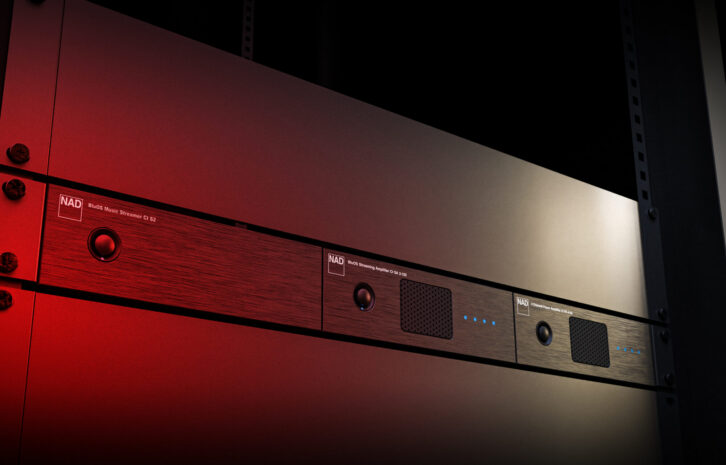
The idea of simple, elegant design with sound quality first still pretty much sums up NAD components today. NAD products always feel like they were designed for the real world, eschewing every bell and whistle to focus on the really important things. The company’s new CI product series takes this same design mindset, but with a CI-centric spin that includes features and design elements that make it feel like they were purposely and thoughtfully designed by someone who has been in the field, installed and commissioned systems, and educated clients on using them. It is those multiple little things that just say, “Man, these guys really put some thought into this!”
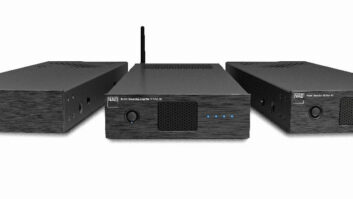
Introduced at CEDIA Expo in 2025, NAD’s new CI Modular Series includes three products: the CI PA4-60 4-channel x 60-watt amplifier, the CI S2 two-zone BluOS streamer, and the CI SA2-120 reviewed here, which combines two zones of streaming with 120 watts of power per zone. All three units are designed to deliver maximum performance in a minimalist footprint.
And unlike that OG NAD AVR I looked at in the mid-’90s, the CI SA2-120 is packed with features, making it a compelling product that was designed specifically to make your installation faster, more efficient, and more successful.
BluOS
While you’re likely familiar with Sonos and HEOS, you might not know BluOS, even though it has been around since 2013. BluOS is the name of Lenbrook’s audio streaming platform, and the CI SA2-120 is a full part of this ecosystem, which now includes more than 80 products from NAD, Bluesound, PSB Speakers, Cyrus, Dali, Monitor Audio, and Roksan. Any BluOS device can be used with any other BluOS device in the same system, delivering consistent use and experience irrespective of the brand or product type, giving integrators the ability to tailor an audio system to a client’s needs on a zone-by-zone basis.
BluOS was built from the ground up to handle high-resolution audio files, and the system supports playback of FLAC, WAV, ALAC, and other files up to 24/192, as well as handling MQA decoding. (The company also uses MQA technology for upsampling low-resolution sources to ensure the best quality from any source.)
A system can support up to 64 zones, wired or wireless, with stable and reliable synchronization across all playback. The system also has robust handling of local files stored on NAS drives, making it a great choice if your client has a large existing collection.
BluOS natively supports streaming from over 25 services, including Spotify, Tidal, Amazon Music HD, SiriusXM, Qobuz, iHeartRadio, TuneIn, Deezer, and Pandora. The big omission is Apple Music; however, since BluOS includes AirPlay 2 support, this likely isn’t a deal breaker. The SA2-120 also has two-way Bluetooth APTX HD, meaning it not only receives but can also broadcast to a pair of connected headphones.
Besides having a robust mobile app for both iOS and Android, there are also desktop versions available for Windows and Mac. Additionally, BluOS has free drivers available for the major control systems, including Crestron, Control4, RTI, URC, NICE, and Lutron, with most of the driver development done in house.
Now in its fourth generation, the BluOS 4.0 app continues to get more powerful yet remain intuitive to use. While every app has a bit of a learning curve, I felt right at home with the BluOS app and was able to quickly figure out how to use it and get music playing. I also love that they have developed a complete BluOS app guide, which you could print and leave with homeowners, so they have a well-designed resource to refer to.
If you’ve ever spent hours walking a job site commissioning a streaming system one zone at a time from another company, you’ll definitely be interested in the new BluOS Configuration Utility. This is a commissioning tool exclusively for integrators that is designed to streamline larger deployments. This utility includes a guided setup wizard that offers bulk device discovery and configuration, allowing for player editing, network setup via wired or Wi-Fi, firmware management, and replicating presets across multiple players. It also allows you to easily discover and identify devices, check and update firmware, issue player commands, test device grouping, and more. The utility lets installers create comprehensive system backups and restore configurations, and gives full visibility into all system operations and commands with device-specific logs to help in troubleshooting.
First Impression
Even though I previously saw the CI Series at CEDIA 2025, my first thought on opening the SA2-120 was how small it was. At just 5.8 inches wide and 5.7 pounds, it’s dinky. But when you turn it around and check under the hood, it’s clear that NAD didn’t skimp on anything, utilizing every inch to maximize the available real estate.
But when you learn about NAD’s ChassisLink design, this 1/3-typical-component-width form factor makes perfect sense. With this, any of NAD’s CI Modular Series components can snap together in any configuration, allowing you to have three components in a single 1U space. The components slide-and-lock together with an integrated system that doesn’t require any tools or a special rack shelf. But what if you just have one or two units? No problem. The smartly designed system includes rack ears that allow you to mount one, two, or three units. The rack ears can also double for surface-mount use if you want to attach a component to the wall, say behind a TV.
Another bit of thought on the NAD design is that the CI S2 streamer is only half the depth of the amplifier. This allows you to rack the two-zone streamer directly on top of the PA4-60 amplifier or SA2-120 while still leaving ample ventilation space without any gaps in the rack. Smart! Using three SA2-120 units like I’m reviewing would allow for six stereo zones at 60 watts per channel, or three stereo zones at 120 watts per channel in a 1U rack space.
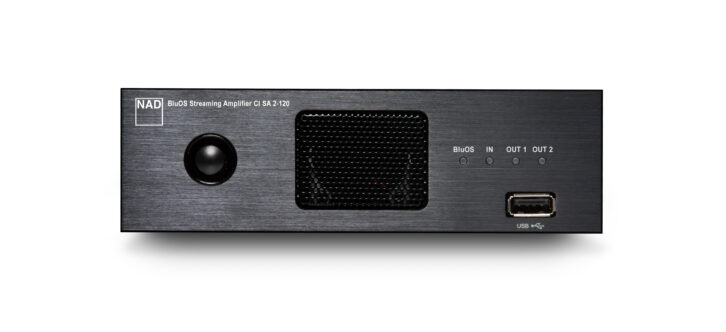
The SA2-120’s front panel is limited to just a power button, four indicator LEDs, a centrally located fan vent, and a USB connection. The LEDs are multi-function, changing color to indicate different operating or fault modes, and they can be configured to be dimmed or defeated. The fan is variable speed and thermostatically controlled, and it comes on at low when the unit reaches 122 degrees Fahrenheit, kicking into medium at 140 degrees, and high speed at 158 degrees. In my living room rack, I don’t believe it ever came on, and certainly never called attention to itself.
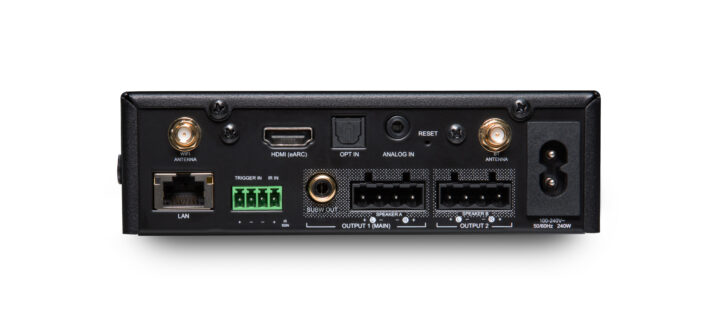
The rear panel is definitely where the action is, and you’ll find input connections for HDMI (eARC), Toslink optical, and a mini-jack analog audio. There are two detachable antennas, one for Wi-Fi and one for Bluetooth. There’s an RCA connection for a subwoofer, a connecting block for a 12-volt trigger input and IR input, an RJ45 for Gigabit Ethernet, and two hefty detachable speaker connecting blocks for zones 1 and 2 that accept up to 12-gauge wire, using snap-on PHX connectors for tool-free connection. As another example of “doing it right,” the speaker blocks are in the correct +/-/-/+ configuration to help avoid a possible short.
The SA2-120’s amplifiers use NAD’s Dynamic Power Management, which automatically detects connections and configures power output to utilize every bit of juice. This means that you get 60 watts with four pairs of speakers connected, 120 watts x 2, and 200-watts-plus (into 4-ohm) with just a single connection. This doesn’t require any configuration of special wiring to enable or reduce the impedance of the load. The amplifiers are stable down to 2 ohms, so if you needed to run multiple pairs of 8-ohm speakers on a single amp channel in a large zone, you’ll be okay.
Regarding power ratings, I feel NAD was a victim of its own honesty for years, electing to provide amplifier ratings based on the most severe conditions: all channels driven simultaneously at full bandwidth at rated distortion, at full, continuous power. Or what NAD refers to as “Full Disclosure Power,” which is a more real-world indicator of an amplifier’s actual power capabilities. But on the sales floor and in spec sheets, uninformed customers might dismiss the NAD because it “only” had 60 watts instead of another brand touting 120 watts or more.
Now NAD gives you a much clearer picture of the unit’s capabilities, providing multiple separate power ratings, including RMS power ratings at 8 and 4 ohms for all channels and two channels driven (60 and 120 watts, respectively) as well as IHF dynamic ratings at 8 and 4 ohms for all channels and two channels (150 and 180/200 watts, respectively), giving you a better idea of the amplifier’s true potential.
Also, the SA2-120 features NAD’s Direct Digital Amplification platform. With this, signals are kept in digital PCM format all the way through the amplification process until they are finally converted to analog at the output/speaker stage. For digital sources, there is digital-to-analog conversion required, and NAD keeps the signal path very short and clean, leading to a very low noise floor and THD. Another benefit is that the amplifiers are very efficient, cool, and compact, while retaining great fidelity.
Something that might not jump out unless you read through NAD’s materials is that the SA2-120 is Dirac Live Ready, allowing you to perform room correction to correct for frequency and timing issues. Utilizing this requires purchasing a license from Dirac, either Limited ($159), which only covers 20–500 Hz, or Full ($249), which can correct the entire frequency range. Also worth noting is that only Zone 1 can be corrected, not Zone 2. (This is more a Dirac limitation than an NAD one, as Dirac doesn’t support multiple licenses on the same device.) Regardless, if using Dirac, connect speakers to Zone 1 where system performance is most important or where room acoustics are particularly challenging.
NAD offers a BluOS Dirac calibration mic for sale on its website for a reasonable $49, or you could use another calibration microphone such as the popular mini DSP umik-1.
Setup
Installing the SA2-120 was a breeze. I just disconnected the speaker outputs for my master bed and bath from my Triad amplifier and connected them to the SA2-120, and then connected the Denon DP-500BT turntable I had on hand to the mini-jack analog input.
Configuration can either be done in the BluOS app, via a Web utility, or using the BluOS Configuration Utility. Because I was just configuring the one unit, I went old-school through the BluOS app. Since I connected to my network via Ethernet, it immediately located the unit and walked me through the setup and configuration. Wi-Fi (2.4 and 5 GHz) connection is done by putting the player into hotspot mode (enabled on startup).
Out of the box, the unit is configured as a fully independent two-zone streamer, which is probably the most likely use case. In this manner, two separate zones appear in the BluOS controller. However, if you have a larger zone you want to fill with more speakers, you can create a fixed group that has both zones appear as one with a single, unified volume control. Also, Zone 2 can be completely disabled, turning the unit into a single-zone player and routing all power to Zone 1 for 120 watts/channel. Outputs for each channel can also be configured as stereo, left, right, or mono.
While the SA2-120 is a fully functional two-zone streamer, there are some limitations regarding its inputs (HDMI, Toslink, analog, Bluetooth) and RCA subwoofer output. These are all linked to Zone 1 only. You can listen to any of these inputs by grouping Zone 2 — or any other BluOS component — with Zone 1 while it is playing an input, but you couldn’t listen to one of these inputs with Zone 1 off or playing something different. Also, while you can add a subwoofer to Zone 2, it would need to be a BluOS network subwoofer. (Zone 1 supports a wired or wireless subwoofer.)
For me, this was a total non-issue. Since Zone 2 was my bathroom, 100% of my listening was done via streaming, and the SA2-120 has fully independent control of streaming, including AirPlay2, Spotify, and Tidal Connect, as well as full API command support. However, if you need to have a fully dedicated suite of inputs available to Zone 2, you could add the Bluesound Hub to the system, which provides five (HDMI eARC, coaxial digital, Toslink optical, RCA, and moving magnet Phono stage) selectable inputs available to any BluOS player in the system.
You have a variety of ways of personalizing the system. Beyond just renaming the zones, you can also rename inputs, as well as choose from a list of icons, or hide them altogether if not in use.
The inputs all have various settings that can be customized to simplify the user experience. For each source (HDMI, Toslink, analog), you can enable Auto Sense, which automatically switches to that source when a valid signal is detected. This was great for my Denon turntable, as once the record began playing, the music just started playing in the zone. This would be equally good for TV audio via HDMI or a CD player. There is also an Auto Sense Ungroup setting that automatically removes the zone from a group when it detects a signal. An AV mode helps with real-time audio syncing (such as with TV audio), and can be important when zones are grouped. Disabling this prefers quality over speed, and is best for audio-only sources. If enabled, you get an adjustable lip-sync delay from 50–150 ms. You can also enable Compressed Grouped Audio, which uses high-quality, low-latency compression when forwarding audio from this source to another zone, said to reduce network load and increase reliability.
Bluetooth offers Manual, Automatic, and Guest settings. Manual mode allows you to switch between sources in the navigation drawer, while Automatic mode switches to the Bluetooth sources whenever a connected device starts playing audio, then giving you the option to switch in the nav drawer. Guest mode switches to the Bluetooth source when a connected device starts playing, but if you switch to another input, Bluetooth will disconnect and will not appear in the nav drawer. You can also disable BT altogether.
As mentioned, the SA2-120 features two-way Bluetooth, meaning it can pair with wireless headphones in Zone 1 for private listening. Imagine if you had an SA2-120 mounted behind a bedroom TV and were using the HDMI input to send audio to a pair of speakers in the bedroom, but in the evening, say someone wanted to watch and listen without disturbing their partner. Voila! Problem solved! It was also nice if I was moving around the house and listening, able to keep the same source playing as I moved about.
The rear panel also has a configurable 12-volt trigger and IR input. The trigger can activate API commands in BluOS such as play/pause, mute/unmute, start a preset, play announcements, etc. NAD calls this “low-level automation without a control system” and allows for some doorbell or security integration. The IR input supports commands from a BluOS remote or can learn remote commands from third parties, such as transport commands, volume, input switching, and triggering 10 different presets. (Currently, IR is only supported in Zone 1, but support for discreet IR to both zones via the same input will be added in an upcoming firmware update.)
Each zone also has independent audio adjustments for balance, bass, and treble (±6 dB), replay gain, and volume limits. If a Dirac Live calibration has been performed, you can select from up to five presets.
If you like to wake or fall asleep to music, you can create alarms or schedules for music to come on and turn off. You can select the station or playlist, volume level (and whether or not it should fade up), and which days it should repeat on. The system even has a built-in fallback alarm that will still play even if your player loses network connection, which is very cool. The sleep timer is adjustable from 15 to 90 minutes.
If you are performing a Dirac Live calibration, you can either connect the microphone directly to the front USB input on the SA2-120 or to a laptop. Since the SA2-120 will likely be in a location longer than a traditional microphone cable would reach, I went with the PC route. The Dirac Live app walks you through the calibration process, showing you where to take measurements and then creating a target curve, and ultimately loading that into one of five slots on the SA2-120. #ProTip: If you are using the NAD microphone, be sure to download and install the microphone calibration file before you run your entire first set of measurements.
Performance
For most people, the system performance is really going to be tied to how user-friendly and rich the app/control experience is, and I think BluOS really excels here. The mobile app (I exclusively used the iOS version) is divided into five sections: Home, Favorites, Music, Players, and Search, which are arrayed across the bottom of the screen. If anything is playing in the current zone, it is presented in a banner showing a small thumbnail, song, artist, and album, with a Play/Pause button and volume indication/adjuster.
The home screen layout is customizable and dynamic based on user behavior and each player’s activity, so content on the home page can be different depending on which player is being controlled. It displays notifications of tips or new features at the top, followed by a list of your most used stations or inputs, a list of up to 10 presets, a list of recently played stations, a list of recently played albums, and a list of your created playlists. This gives super quick and easy access to jump back into anything you were listening to or to start your favorite station playing in a clean and uncluttered presentation.
The Favorites tab is arranged by music service, again allowing you to customize the layout. For example, when I select Tidal, I see all of the curated My Mix stations, a list of favorited songs, Playlists I’ve added, My Playlists I’ve created, Artists I’m following, and Albums I’ve favorited. Pandora shows me a list of all my stations, and iHeartRadio shows me artists I’m following and any favorited stations.
The Music tab lets you add music services as well as jump into each service and get a richer control experience. For example, selecting Pandora, I can see my most recently played stations, see my entire collection of stations, or browse Pandora suggestions like genres, trending artists, decades, top artists, moods, and top stations. In Tidal, I am given options for browsing New, TIDAL Rising, Recommendations, Popular, Moods, Genres, My Music, and a list of albums I’ve recently favorited.
Players show all the available zones, in my case Bedroom (Zone 1) and Master Bath (Zone 2), and its current volume settings. Here you select which area to control, and tapping a player shows what is currently playing (or paused) in that area. Tabs at the bottom allow you to quickly group all players together to start playing the same content, or pause all of them. I really liked the little arrow icon in the zone you’re currently controlling, which instantly transfers whatever is currently playing in that zone to another while also turning off the zone you’re transferring from. For people who move about the house while listening, this is a great feature.
Finally, there is Search, which is exactly what you’d expect. BluOS doesn’t search simultaneously across all/multiple music services, but has you select the service you want to search. So, if I want to see what is available from “Noah Kahan” on Tidal (I’m kind of obsessed with “Stick Season (Forever)” right now), I would select Tidal, search “Noah,” select his name from the list of artists to then see his bio, top tracks, albums, EPs & Singles, and Similar Artists. This single-service search didn’t bother me, but I concede that a global search feature could be handy, and NAD implied this was a feature “we don’t yet support,” so it may be coming.
Clicking the banner of the currently playing content brings up a full page of album art along with navigation buttons, as well as shuffle and repeat tables. I also really like that it displays the playback quality, from MP3 to CD to HR (high resolution), along with the bit rate.
I loved that BluOS had a Windows controller. When I’m working on my laptop, it’s kind of a hassle to grab my phone, open the app, then make a change. With the Windows app, I could have a full control experience with a layout designed to take advantage of the larger screen size.
Regardless of which BluOS app I was using, control was fast and responsive. I never had any issues where it couldn’t find or connect to the players or where music stopped playing.
I have Monitor Audio Creator Series C3L speakers in my bedroom and C2M in my bathroom, and the SA2-120 amplifiers produced rich, deep bass and articulation and plenty of volume. The three-way C3L’s with Monitor’s IDC II tweeter are especially detailed, and I never felt like the SA2-120 was having any issues driving them and producing great sound.
Without question, audio quality was improved by the Dirac calibration. Post-calibration at the “sweet spot” (sitting up in the center of my bed), audio was far more focused, with a much tighter and more articulate center image, really feeling like I had a solid phantom center over my head. Toggling it off, the soundstage became wider and sounded a bit fuzzy. Now, when I moved off the bed and walked around the room, the effects of the calibration were far less apparent. So, if you have a room where there is a consistent listening position, the Dirac Live license can be worthwhile; otherwise maybe not.
With the CI SA2-120, NAD has created a two-zone streamer with the custom installation channel firmly in mind, with performance and features that will tick nearly every box you can imagine. And with the unique ChassisLink design, you can gang an incredibly powerful system together in the smallest amount of rack real estate. I honestly can’t think of a reason why you wouldn’t consider this for projects of any size. Highly recommended.
Product Specs:
- Two-zone BluOS streamer with amplification
- Dynamic Power Management automatically optimizes power distribution from >200 W x 1 (4-ohm), 120 W x 2, 60 W x 4
- Part of the BluOS ecosystem supporting up to 64 zones and 24/192
- Dirac Live ready; Dirac license (full or limited) required
- Natively supports 25+ streaming services, including Spotify, Tidal, Amazon Music HD, SiriusXM, Qobuz, iHeartRadio, TuneIn, Deezer, and Pandora
- Bluetooth aptX HD two-way, AirPlay2, Spotify Connect, and Tidal Connect
- Third-party control drivers for Control4, Crestron, URC, RTI, NICE, Lutron, and KNX
- Inputs: HDMI eARC, Toslink optical, Analog audio mini-jack, 4-pin PHX connector (12volt trigger and IR); Outputs: RJ45 Gigabit Ethernet, USB (front), detachable antennas for Wi-Fi and Bluetooth, RCA subwoofer, two 4-pin PHX connectors for speakers (up to 12AWG); detachable power cord
- Dimensions: 5.8 x 1.73 x 15.11 inches (WxHxD)
- Weight: 5.7 pounds