The first smart thermostats were simple digital timers that set back heating and air conditioning systems at fixed times when homeowners went to work or to bed. Today, smart thermostats have evolved into central components of modern home energy management and offer clear returns on investment through efficiency and automation.
The primary financial return of smart thermostats comes from direct savings on utilities. According to the U.S. Energy Star website, a properly configured smart thermostat reduces annual heating and cooling bills by roughly 8%, with savings in extreme climates or irregularly occupied homes reaching up to 15%. And according to ThermoFacts, when the savings on utility bills are paired with rebates and demand-response incentives from utility companies, the initial hardware cost typically pays for itself within one to two years.

This is welcome news for homeowners as the cost of electricity, heating oil, natural gas, and propane, all used for home heating, are rising and are placing a severe strain on consumer finances. This is forcing many families to make difficult trade-offs to cover basic necessities. According to a recent survey from Consumer Reports, 68% of Americans report that their household budgets are already strained to some degree by energy bills.
Beyond savings on utility bills, smart thermostats significantly improve home comfort through precise environmental management. Features like geofencing leverage smartphone location services to set back temperatures when the home is unoccupied and pre-condition the air prior to the homeowners’ return. Additionally, remote room sensors resolve common temperature imbalances in homes by prioritizing active living spaces based on occupancy and time of day.
Also by Jay Basen: Sensors Are the Heart of the Smart Home
From an operational standpoint, the value of a smart thermostat comes from its integration with popular smart home ecosystems. Homeowners can adjust settings via mobile apps or voice assistants, and integration with local smart home logic allows climate states to be triggered automatically. For example, an HVAC system can be automatically turned off when windows are opened.
Finally, these devices provide crucial preventative maintenance value through automated reminders to change the furnace filter, run-time analytics, and early alerts for equipment anomalies before expensive HVAC failures occur.
One company that makes an award-winning smart thermostat is Google.
Google Nest
Nest is Google’s line of smart home hardware and services. The products in the line are designed to automate and connect everyday household functions. Originally founded as Nest Labs in 2010 and acquired by Google in 2014, the brand encompasses a broad range of connected devices that are managed primarily through the Google Home ecosystem. Its lineup includes:
- Climate control with the Nest Thermostat and Nest Learning Thermostat (4th gen)
- Home security and safety through Nest Cams and Nest Doorbells
- Voice-enabled audio via the Google Home Speaker
- Visual control centers like the Nest Hub (2nd gen) and Nest Hub Max
- Home networking using the Nest Wifi Pro
Google is a founding member of the standards committee that is developing the Matter smart home protocol for interoperability between major smart home brands and connected smart accessories. This effort is driving Google Nest smart home products to leverage the Matter protocol and be compatible with a wide range of smart home platforms.
Google Nest Learning Thermostat
Google’s Nest line of thermostats has earned awards based on its industrial design, technology, and sustainability. Some of these include:
- Red Dot Product Design Award for its industrial design
- CES Innovation Awards for introducing machine learning into residential HVAC controls
- T3 Magazine award for best connected energy product.
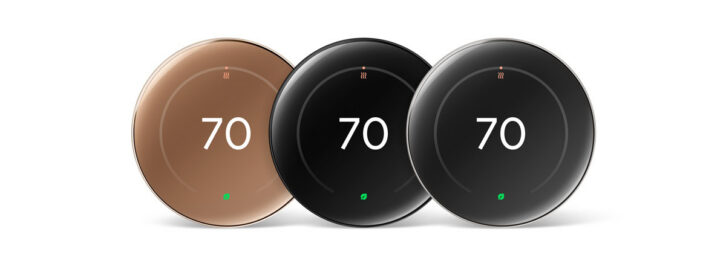
The Nest Learning Thermostat (4th gen) features significant hardware, display, and AI upgrades over its predecessors. Its features include:
Hardware and Visual Design
- Borderless Display: High-resolution circular display with an ultra-thin bezel
- Rotating Metal Ring: A tactile metal ring is used for control. It is available in Polished Silver, Polished Gold, and Polished Obsidian. .
- Dynamic Farsight: An internal motion sensor adjusts what is displayed on the thermostat based on the location of a user. When no user is detected close to the thermostat, it shows high-level information like the time, weather, or ambient temperature. When a user approaches the thermostat, the view changes to show more detailed information.
- 2nd-Gen Temperature Sensor: The thermostat can be purchased with, or without, a remote sensor to monitor the temperature elsewhere in the home.
Smart Heating and Cooling Features
- Smart Schedule: Automatically analyzes inhabitants’ usage patterns and weather changes to build a custom heating/cooling schedule. Potential energy-saving adjustments can be automatically implemented or shown as suggestions in the Google Home app. In either case, the user is notified of the adjustment.
- Adaptive Eco: Local weather conditions and home insulation performance are used to set energy-saving temperatures while homeowners are away to ensure that the home warms up or cools down within an hour of their return.
- Natural Heating and Cooling: Pauses or reduces the heating/cooling system operation when sunlight or ambient outside temperatures will assist in heating or cooling the home.
- Humidity Helper: Manages indoor humidity levels using air conditioners, heat pumps, or standalone dehumidifiers/humidifiers to keep the home more comfortable and lower the risk of mold growth.
- Demand-Response Integration: Integrates with select power company demand-response systems to reduce the home’s load on the grid during periods of high demand.
Ecosystem and System Health
- System Health Monitor: The thermostat continuously monitors heating/cooling system performance and alerts the user when anomalies are detected.
- Power Sharing (No C-Wire Required): Designed to draw adequate power over existing thermostat wiring without requiring a dedicated common (C) wire for most 24V HVAC configurations.
New Features for Professional Integrators
While consumers focus on aesthetics and smart features, professional HVAC installers and smart home integrators evaluate thermostats based on system compatibility, installation efficiency, and post-install servicing.
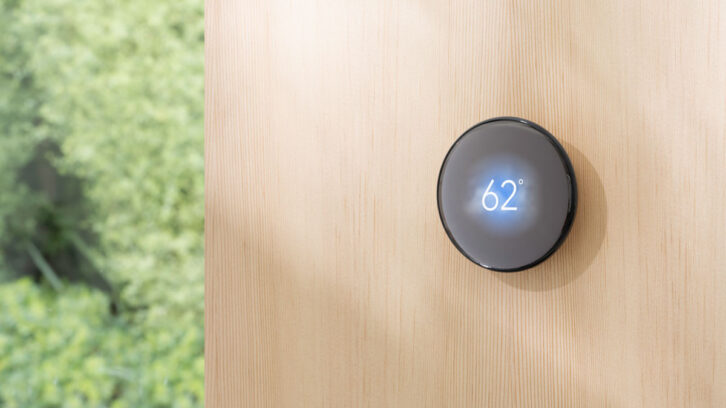
The Google Nest Learning Thermostat (4th gen) is designed to streamline contractor workflows and supports complex multi-stage HVAC equipment. The system offers expanded HVAC compatibility starting with a 12-terminal backplate that accommodates complex residential configurations without requiring add-on modules. Dedicated terminals provide direct control over 24V accessories like humidifiers, dehumidifiers, ERVs, HRVs, and standalone fresh-air ventilation. Additionally, the thermostat supports up to 3-stage conventional heating and cooling, or up to 5-stage heat and 3-stage cool for heat pumps and hybrid systems (including multi-stage auxiliary heat). It also incorporates smart ventilation algorithms to meet ASHRAE 62.2 mechanical ventilation standards required in new construction and major retrofits.
For professional installation, technicians can fully configure, calibrate, and run diagnostics locally on the thermostat, or through contractor setup tools, without relying on the homeowner’s phone or Wi-Fi network. Built-in system diagnostics allow technicians to independently commission the system before handing it over to the customer.
To prevent callbacks, advanced parameter controls allow professionals to fine-tune compressor lockout temperatures, auxiliary heat upstage timers, droop temperatures, and minimum runtime delays, preventing short-cycling and protecting homeowners from overusing expensive auxiliary resistance heat. Installers can also configure detailed cycle times to protect equipment. In addition, cool-to-dry and dehumidification limits let contractors set maximum overcooling thresholds (e.g., cooling 2–3 degrees past the setpoint to lower relative humidity) to manage moisture effectively without freezing coils.
Finally, contractor branding and recurring business features include digital “Nest Pro ID” integration. Contractors input their six-digit ID during setup so their contact information appears alongside maintenance alerts in the homeowner’s app.
Integration Capabilities
The Google Nest Learning Thermostat includes support for the Matter smart home standard for integration with third-party smart home ecosystems. Supported ecosystems include Apple Home, Amazon Alexa, and Samsung SmartThings. Matter can also be leveraged for integration with some professional smart home ecosystems using third-party drivers.
The thermostat’s Thread/Matter support leverages advanced Thread wireless networking to establish direct, low-latency, and low-power communication with remote sensors and smart home hubs.
Installation
Google supplied me with a Google Nest Learning Thermostat (4th gen) to evaluate for this article.
There are two setup options offered by Google: the standard installation and the Pro installation. Only professionals who understand all the details of HVAC systems should choose the Pro installation option as you will be given the option to change advanced settings that, if incorrectly set, could damage an HVAC system. For this reason, I chose the basic installation process.
As you would expect, Google has made the installation of their thermostat as easy as possible. They have even created a video to guide a homeowner through the installation process (that video can be found here).
Overall, installation is easy and Google says you only need a screwdriver and a pencil to complete the process. But, if your walls are made of drywall, Google recommends installing the thermostat backplate using wall anchors. So, in this case, you will also need a drill and the appropriate drill bit for the installation of the anchors. Finally, I found it better to insert the thermostat wires from my HVAC system into the thermostat’s base plate using a set of needle-nose pliers. So, you might want to have a set on hand.
The basic steps to install the thermostat are:
- Open the Google Home app on your phone or tablet, press the + sign, and select to add a device.
- Scan the QR code on the back of the thermostat. At this point, the Google Home app will walk you through the remaining steps to complete the installation and setup process.
- Turn off the power to your HVAC system.
- Take a picture of the wiring of your existing thermostat in case there is a problem later.
- In the app you will enter the specific wires that are connected to your old thermostat. Depending on which wires are used, the Google Home app may provide you with additional instructions.
- Label the thermostat wires using the stickers included with the new thermostat.
- Disconnect the wires from your old thermostat’s back plate.
- Install the new back plate provided with the Google Nest Learning Thermostat and optionally install the trim plate if you need to hide blemishes on your wall. Use the bubble level at the top of the back plate to assure it is installed straight.
- Connect the wires from your HVAC system to the new thermostat back plate.
- Attach the thermostat display to the back plate and turn the HVAC system’s power back on.
- Select your language.
- The app will display the wires that the thermostat detects are connected to it. Validate that this matches what wires you have physically connected to the backplate.
- Select what mode (heating or cooling) your thermostat should be operating in.
- Select your Wi-Fi SSID and enter your Wi-Fi password to connect the thermostat to your network.
- Select the room in your home where the thermostat is located.
- Select the optional energy-saving features you want to enable. These can also be enabled later in the thermostat’s settings.
You are done!
Professional installers have the option of not using the Google Home app to configure the thermostat and instead configuring it by following prompts on the thermostat’s display. However, smart features of the thermostat will not be enabled until the setup is completed using the Google Home app.
The one problem I ran into during the installation process is that even though drywall walls are very common in homes, wall anchors aren’t included with the thermostat. So, if your walls are made of drywall, you will have to make a trip to the hardware store if you don’t have any wall anchors on hand.
Operation
The Google Nest Learning Thermostat has a very intuitive user interface. However, if set up correctly, you shouldn’t have to use the UI very often. The thermostat’s advanced features, including Smart Scheduling, Adaptive Eco, and Natural Heating & Cooling, will adjust the thermostat’s settings for you, save you money, and keep you comfortable in your home.
Smart Scheduling is especially useful. It automatically creates and optimizes your home’s temperature plan by observing your daily routines and habits. When you adjust the temperature directly on the device or using the Google Home app, the thermostat learns your preferred comfort levels for different times of the day. It then sends a notification and either automatically makes changes to your schedule or provides suggestions in the Google Home app if you haven’t given it permission to change your schedule for you.
Smart Scheduling also integrates with your phone’s location, the thermostat’s built-in motion sensors to detect when the house is empty, and other smart home products paired in the Google Home app. It also leverages energy-saving Eco Temperatures to cut down on utility costs. Furthermore, it tracks separate, independent schedules for heat, cool, and heat/cool (auto) modes to keep you comfortable through changing seasons.
Integration
In the past, integration of Google’s Nest line of thermostats has been challenging. However, the Google Nest Learning Thermostat (4th gen) supports the Matter smart home standard. So, the thermostat can be integrated with Apple Home, Alexa, Samsung SmartThings, Home Assistant, the Hubitat Elevation Hub, and other Matter-compatible smart home ecosystems.
When I first tried to integrate the thermostat with Apple Home and a Hubitat C-8 Pro hub using the Matter pairing QR code that is displayed on the thermostat through the thermostat’s settings, I couldn’t get it to work. After some research I found that I had to instead create a pairing code using the Google Home app. Once I did this, I was able to successfully integrate the thermostat with both ecosystems.
Control of the thermostat’s mode (heat, cool, etc.) and the temperature setpoint works well through Matter. However, Google did not expose control of the fan mode (on, auto) through Matter. This is a basic function of the thermostat so it is very disappointing that it is missing.
Also by Jay Basen: Going Beyond the Matter Standard with Aqara Signal Synchronization and Advanced Matter Bridging
A second missing feature is the ability to set the occupancy of the home or whether family members have gone to bed from a third-party ecosystem through Matter. Accurately determining whether a home is occupied or not is one of the more challenging problems in a smart home. The Google Nest Learning Thermostat uses a built-in motion sensor and geo-fencing of family members’ smartphones. However, if a family member accidentally leaves their phone at home, or if the family goes to dinner at a neighbor’s house that isn’t outside the geofence used to determine occupancy, then the home/away status used by the thermostat will be wrong. This will result in the thermostat not setting back the set point and the homeowners will be wasting money on heating or cooling an unoccupied house.
This isn’t just a problem with the Google Nest thermostat. It is a problem shared by other smart thermostats on the market that try to determine occupancy of a home using geofencing. For this reason, I prefer to use more advanced logic in a smart home hub to determine occupancy. But without the ability for third-party smart home ecosystems to communicate occupancy status to the thermostat, Smart Scheduling, Adaptive Eco, and Natural Heating & Cooling become much less useful features, as the third-party smart home ecosystem will have to directly adjust the thermostat set point, which eliminates the thermostat’s ability to add its own intelligence.
Conclusions
The Google Nest Learning Thermostat (4th gen) is an excellent smart thermostat for most people.
- It is easy to use.
- It offers advanced features to save a homeowner more money on their utility bills.
- It is visually appealing.
- A homeowner can optionally choose to have the thermostat installed by a Google Nest professional.
- It can control more complex HVAC systems
- It includes features designed specifically for the professional installer without complicating the setup and use by a homeowner.
But smart home enthusiasts may have issues with the thermostat. While Google has included support for the Matter smart home standard, that support is missing key features that limits the ability for the thermostat to be effectively used when integrated with third-party ecosystems in a smart home.
For more information, visit https://store.google.com/us/product/nest_learning_thermostat_4th_gen.