There is a lot for smart home owners to like about the Matter smart home standard. One of the primary advantages of Matter is the elimination of research on compatibility before buying smart home devices. Instead of studying packaging for specific ecosystem logos, homeowners can select any Matter-certified light, lock, or sensor and know it will integrate seamlessly into their Matter-compatible smart home platform of choice, including Apple Home, Google Home, Amazon Alexa, Home Assistant, Hubitat Elevation, Homey, and others.
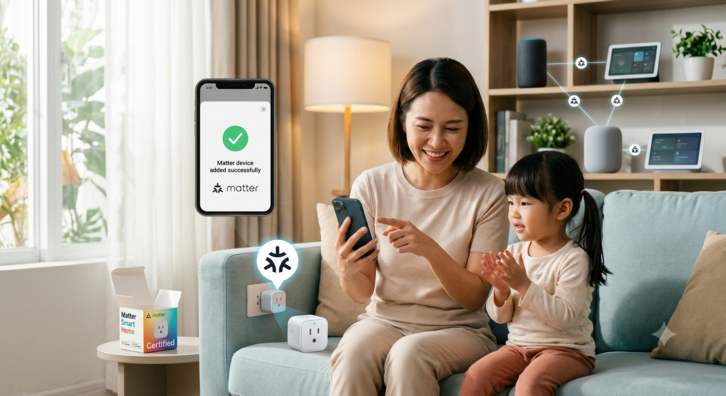
A second important feature of Matter is Multi-Admin support. This allows a Matter-compatible smart home accessory to be paired with multiple smart home platforms. For example, one family member can adjust the lights using the Apple Home app on their iPhone while another prefers to control the same lights using voice commands spoken to an Amazon Alexa smart speaker, all without causing configuration conflicts.
Beyond the above, Matter delivers a fast, reliable, and private smart home environment. Because device communication occurs locally across the home network, rather than routing through cloud servers, commands trigger quickly, and automated routines continue running smoothly during internet outages.
Some other advantages to smart home owners provided by the Matter standard include:
- Onboarding new hardware requires only scanning a single QR code
- A homeowner no longer has to purchase a proprietary hub for each brand of accessory they purchase
- For privacy, communications are confined to the local network and include end-to-end encryption
- For security, Matter-compatible accessories include device attestation. Device attestation is a cryptographic security process that verifies a smart home accessory is a genuine product from an authorized manufacturer and that it complies with official standards. It stops unverified hardware from acting as an entry point for network intrusions
While the Matter standard successfully solves the problems of interoperability and local control across different smart home platforms, its reliance on agreement between multiple organizations that make up the standards committee forces it into a “least common denominator” model. To ensure every smart home accessory works reliably across all the different Matter-compatible platforms, the specification relies on an approach that incorporates only fundamental capabilities. Consequently, brand-exclusive features and advanced hardware functionality are stripped away when accessed solely through Matter.
There is also a lag between hardware innovation and protocol support. Adding new device types or fine-grained attributes to the specification requires lengthy negotiation among the member companies within the Connectivity Standards Alliance. Even when a feature is added to the official Matter specification, there is an additional lag before major platform manufacturers (Apple, Amazon, Google, etc.) build the necessary user interfaces and backend software to support it. As a result, users are forced to maintain original manufacturer apps alongside their primary smart home platforms to access firmware updates, detailed device settings, and advanced features. So, Matter functions exceptionally well as a universal, local foundation for basic control, but remains restrictive for users seeking rich, deep functionality from specialized devices.
Aqara has developed a workaround to expose advanced features of their products through Matter.
Aqara
Aqara is a prominent global smart home manufacturer. It is highly regarded for providing a comprehensive and affordable ecosystem of reliable automation devices. These devices include smart home hubs, sensors, switches, cameras, locks, and more.
Aqara’s smart home accessories primarily communicate using the Zigbee wireless protocol. They use proprietary hubs to create a local mesh network and bridge the devices connected to it to the Internet. A key strength of the brand is its commitment to cross-platform compatibility, ensuring its products work seamlessly with major ecosystems like Apple Home, Google Home, and Amazon Alexa. To further enhance interoperability, Aqara is actively incorporating the Matter standard into their products.
Advanced Matter Bridging
Existing smart home owners who have started working with Matter are probably aware of a technique called Bridging. When implemented in a manufacturer’s proprietary hub, Bridging allows non-Matter devices, typically those running on protocols like Zigbee, Z-Wave, or Bluetooth, to appear as standard Matter accessories to platforms like Apple Home, Amazon Alexa, Google Home, and others. Bridging has been an important feature to provide homeowners with the ability to transition to Matter within their existing smart homes without having to replace all their smart home accessories.
Aqara has taken bridging one step further with the development of Advanced Matter Bridging. Advanced Matter Bridging is a technique to bypass current limitations in the official Matter specification. While standard Matter bridging exposes supported device types (like door sensors or smart plugs) directly to Matter-compatible smart home platforms, it often leaves proprietary or complex features behind. Advanced Matter Bridging translates these proprietary features into standardized virtual Matter devices so third-party platforms can integrate with them. It does this by exposing proprietary features as virtual Matter occupancy sensors or switches. For example, proprietary triggers, such as the camera on a smart video doorbell recognizing a homeowner’s face, a lingerer being detected, or the doorbell being pressed, are exposed as virtual occupancy sensors. When a proprietary condition is met (i.e., the doorbell is pressed), the state of the associated virtual occupancy sensor is toggled in Matter. Multi-step routines or unsupported device actions within the Aqara ecosystem are exposed as Matter-compatible virtual switches that can be triggered by automations or routines on another platform.
It should be noted that some other manufacturers have seen the value of the work done by Aqara and implemented their own Matter device virtualization to overcome some of the limitations of Matter and the delays inherent in the standardization process.
Hands on with Advanced Matter Bridging, the Aqara Doorbell Camera Hub G410, and the Hubitat Elevation Hub
Before moving to a smart video doorbell, I used an ELK-930 Doorbell and Phone Ring Detector to sense when my doorbell was pressed. Pressing the doorbell would trigger a smart home automation to turn on the porch and outdoor pathway lights at night for five minutes.
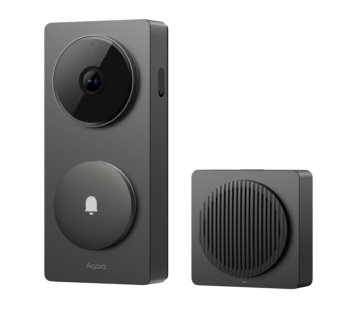
The Aqara G410 is a very nice video doorbell with high-quality video and a mmWave presence sensor that eliminates the problems of having presence triggered by a camera “seeing” the moving shadows of tree branches and leaves being blown by the wind. However, due to the limitations of Matter, I initially couldn’t find a way to turn on my outside lights when the doorbell was pressed or a lingerer was detected by the mmWave presence sensor in the G410.
The Advanced Matter Bridge is a community-developed software driver for the Hubitat Elevation Hub written by @kkossev (similar functionality is available on Home Assistant). I had used it successfully with some smart products by SwitchBot and Orein to expose functionality that was not available with the standard Hubitat implementation of Matter. Initially, it didn’t help me expose more advanced functionality of the Aqara G410. But I learned that I simply had to expose the functionality I was looking for through Signal Synchronization on any Matter-compatible Aqara hub (the G410 has Matter hub functionality built into it, so this doesn’t require the purchase of additional hardware).
To implement Signal Synchronization, you just need to do the following:
- In the Aqara Home App, go to Profile ➔ Connected Ecosystems ➔ Matter
- Tap Scene & Signal Sync, then select Signal management
- Tap the + (plus) icon to add a new signal rule
- Under the “IF” section, tap Add and select your Doorbell Camera Hub G410
- Choose your specific trigger condition (e.g., Doorbell ringing, Face detected, or Linger alert)
- Set the acting time window if desired, then save
- Enter a Name for the signal (e.g., “Doorbell Ringing” or “Unknown Person Loitering”)
- Check the box that says “Add to Matter” and tap OK
Now I had two new presence sensors shown on my Hubitat Elevation Hub, one that would show an active state when the doorbell was pressed and one that would show an active state when the mmWave presence sensor triggered that a lingerer was detected. These were easy to tie to an automation that turned on the porch and outside pathway lights at night.
Related: Security Starts at the Street
To go the other direction, you can expose a scene created on an Aqara hub that contains multiple smart home actions and trigger it from a Hubitat Elevation Hub.
- In the Aqara Home app, create a scene containing the actions you want to run
- Go to Profile Connect to Ecosystems Matter Expose Scenes/Actions
- Select the target scene and save.
The Scene will be exposed across the Matter bridge as a virtual Matter On/Off Smart Plug. Just turn the plug on to trigger the scene.
Conclusions
Critiques of the Matter Smart Home standard have pointed to how slow the standard has taken to evolve, the time it takes all the members of the standards committee to make decisions, and the least common denominator approach to implementing features for different smart home accessories. All this is true. However, at this point, the standard has come a long way, and companies like Aqara are finding creative ways to expose advanced features of their products that aren’t otherwise supported by Matter.