Kudos: Incredible value/performance; great black levels; solid dynamic HDR tone mapping
Concerns: Can’t display 1080i signals; no 12-volt trigger
If you grew up in the 1970s, you were part of “the Cola Wars” and you likely encountered “The Pepsi Challenge” at some point. (Yes, I was there.)
This was usually held at a shopping mall or grocery store where a person behind a small cart at the front of the store would serve you two small, unmarked cups of soda: one with Pepsi and the other with Coke. You would take a sip of each and then select your preferred soda, after which it was revealed which was the Pepsi and which was the Coke.
This reminds me a bit of the ongoing tug-of-war for projector supremacy between JVC and Sony. And like Pepsi and Coke, many people have a preference for one or the other, and the companies often have shootouts between each other’s comparable models.
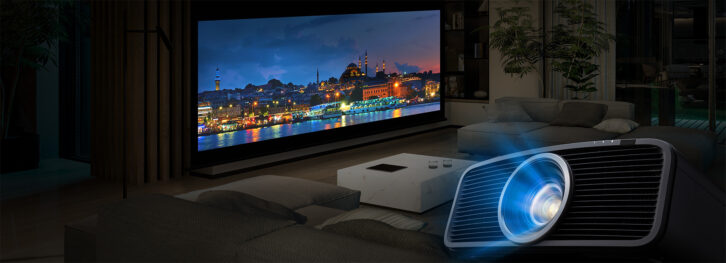
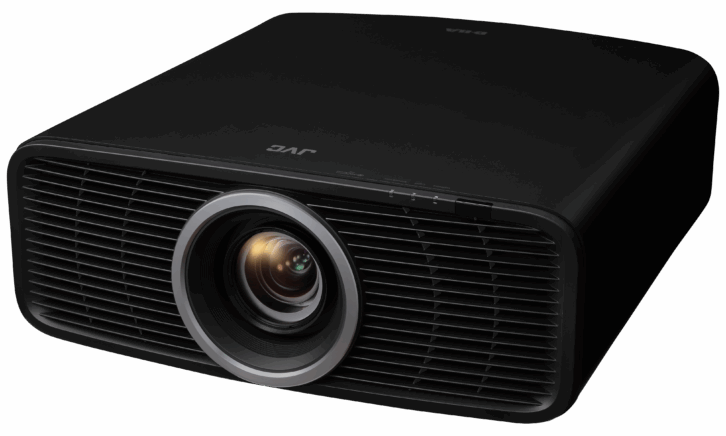
Both companies were early to market with true, native 4K lamp-based projectors, and then both transitioned to laser-based 4K models. At CEDIA Expo 2024, JVC released two models, the new DLA-NZ500 and NZ700, currently the world’s smallest native 4K projectors. The NZ500 is at a price point that will make lamp-based models all but obsolete in any modern home theater. [As is JVC’s habit, the NZ500 projector is from JVC’s Procision Series, but there is also a Reference Series known as the DLA-RS1200. These units have identical specs, performance, and pricing, but are available through different distribution channels and have different colorings around the trim ring surrounding the lens.]
Upgrades and Improvements
Beyond bringing native 4K laser pricing to a new entry-level model for JVC, the NZ500 also comes with a significant size reduction from its previous entry-level 4K offering, the NZ7. I happened to own an NZ7, and it was clear from the jump that this model is significantly smaller. The NZ500’s new design has an overall volume reduction of 35% compared to that model, and, as mentioned, clocks in as the world’s smallest native 4K laser projector currently available. Compared to the Sony XW5000ES — the previous titleholder of the smallest native 4K laser projector — which measures 18.13 x 7.88 x 18.59 inches (WxHxD), the NZ500 is 17.72 x 7.16 x 18.88 inches. Not night-and-day smaller, but smaller, and with its rounded chassis compared to the more angular design Sony employs, it looks more compact.
This is all due to a complete component design, including a new optical unit, lens, BLU-Escent laser, and new processor/scaling engine. JVC also reversed the air intake and exhaust, with the NZ500 pulling cool air in from the front and exhausting it out the back of the projector, which allows the unit to sit closer to the back wall and not have any ventilation issues.
The NZ500 is also more environmentally friendly, having a reduction in plastic due to the smaller size, which also reduces the materials used for packaging and transportation costs. The new laser module and optical unit improve lumens-per-watt by 30% — approximately twice as efficient as the first BLU-Escent model — making it cheaper to run and with 0% mercury usage (compared to lamp-based models) due to the laser light source.
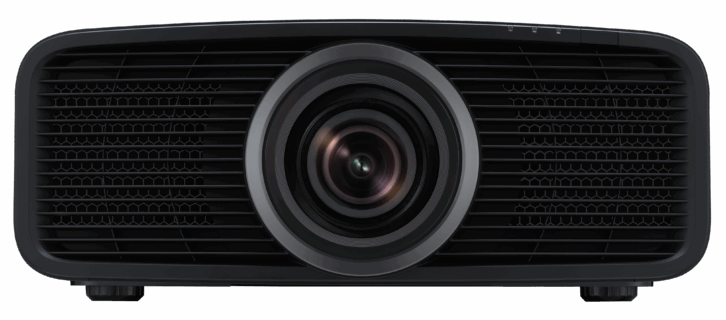
Of course, the key selling points of laser are a long life with virtually zero maintenance, with these models having an estimated 20,000 hours of operation to 50% brightness. Beyond longevity, a laser light source offers other benefits over lamp-based projectors, such as consistent brightness and color across its lifespan, less turn-on “stress” on the light engine, and the ability to instantly turn off to deliver a true black and infinite dynamic contrast ratio. Laser can also have far quicker turn-on/off times, not requiring the lengthy warm-up or cool-down period of lamp-based models.
The unit retains JVC’s native 4K D-ILA (Direct-Drive Image Light Amplification) technology and uses 0.69-inch chips that utilize the DCI pixel layout of 4096 x 2160 versus the home UHD standard 3840 x 2160. In practice, this is irrelevant, as the JVC black level is so good/dark that you don’t notice any light from the non-used pixels.
JVC has really become known for two things in the front projection world: native contrast/black levels and dynamic tone mapping. The NZ500 definitely continues this tradition.
The NZ500 boasts native contrast of 40,000:1 and features JVC’s second-generation Frame Adapt HDR processing technology, which uses a proprietary algorithm to analyze the maximum brightness of HDR10 content on a per-scene or per-frame basis for real-time dynamic tone mapping. In addition, the NZ500 also supports HDR10+, a dynamic HDR format akin to Dolby Vision. HDR10+ had previously been reserved for a handful of UHD Blu-ray disc releases, however, it was recently announced that Netflix would start streaming content coded with HDR10+ metadata, so this feature could become a compelling purchasing driver. (It also supports the HLG — Hybrid Log Gamma — HDR standard, which still hasn’t seemed to catch on.)
As the name implies, Dynamic Tone Mapping optimizes brightness on a frame-by-frame level, using signal processing to enhance the brightest areas on the screen to retain better gradation, contrast, and a wider dynamic range. A new Deep Black function has been added to JVC’s Frame Adapt HDR processing to achieve the most realistic and detailed black levels.
If you’ve read anything about projectors in the current HDR world, then you’ve doubtless run across the term “tone mapping.” Why is this so important for projectors? Theatrical content is mastered on studio monitors capable of reaching 1000 nits, with Hollywood’s workflow shifting to mastering monitors capable of displaying 4000 nits. The problem is most projectors would struggle to produce 350 nits. So, this content needs to be translated from 0 to 1000 (or even 4000, or up to 10,000) nits, to a range of 0 to 300 that the projector can reasonably handle. But this needs to be performed in a way that maintains both the bright and dark details in the image. When performed correctly, the image will retain the shadow details in dark images while retaining the specular highlights found in really bright images, like shots of the sun, lightning flashes, or snowy mountains. If a projector tone maps poorly, the darker areas or the brighter areas (or both) can be “crushed,” losing detail that was meant to be visible and having no subtlety.
One feature missing from the new NZ500 projector is the ability to do 3D. If 3D viewing is important, then you’d need to step up to JVC’s NZ800.
Install
The NZ500 gives you the ability to either front-, rear-, ceiling-, or shelf-mount the projector. If you are shelf-mounting, it offers adjustable feet so you can get it perfectly level and square. When ceiling-mounting, the NZ500 utilizes four mounting holes, allowing for an easier time of squaring and leveling the unit to the screen.
As it was a review sample that would not be a permanent resident in my theater, I set the NZ500 on a box in my kitchen, which happens to line up centered on my screen. Once I got it square and level to the screen, installation was as simple as adjusting the lens to fit and focus on the screen.
The NZ500’s lens has a throw ratio of 1.34:1 to 2.14:1. This means for a 100-inch, 16×9 image, the projector could sit anywhere from 117 to 189 inches from the screen, and for a 150-inch image, it could sit from 177 to 284 inches. This generous range should give it the ability to replace almost any existing projector at the same location. It also offers a vertical lens shift of ±70%, and a horizontal shift of ±28% if you can’t get it positioned dead center.
I have a dual-aspect Draper motorized screen that is 92 inches (16×9) and 115 inches (2.35:1) diagonal. Because of this, the fully motorized 80mm (11 group, 15 lenses) 4K lens system with memory on the NZ500 is a massive upgrade over the Sony XW5000ES, which features a manual lens. The NZ500 also allows for five different lens memory positions that store shift, zoom, focus, pixel adjust, masking, screen setting, keystone, and aspect. You can also rename these settings so you’ll know which to recall for the variety of aspect ratios employed by modern directors and streaming services.
For those with an anamorphic lens, the JVC has four different settings, which can stretch the image vertically, compress the image horizontally, and switch to two other modes for use with Panamorph’s DCR lenses.
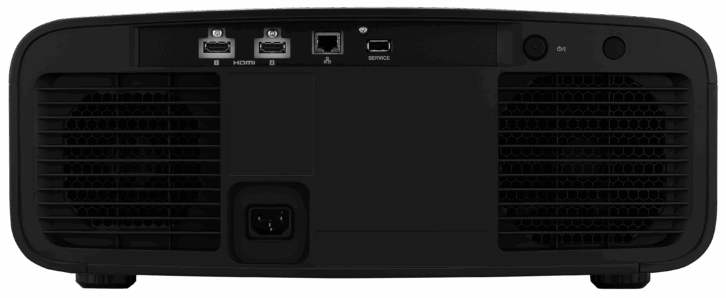
As mentioned, JVC redesigned the airflow of the NZ500, bringing fresh air from the front of the room and exhausting hot air out the back. One thing they didn’t change is the location of the connections, which are still on the rear of the unit. For most installations, this likely won’t be an issue, but if you need every inch of throw to get the image to fill the screen, these cables — HDMI, power, and potentially LAN — will keep you from putting the projector right up against a wall.
The projector includes two HDMI inputs along with an RJ45 for connection to a LAN, all located on the rear, with a detachable power connection. There is also a USB connection that is used for firmware updates and backing up settings.
The HDMI inputs accept signals up to 32 Gbps and resolutions up to 4K/60, so if you are hoping to game in 4K/120, you will need to look elsewhere.
Few people may miss the lack of an RS-232 connection, but more disappointing is the lack of a 12-volt trigger out, which is incredibly handy for triggering an anamorphic lens sled or a motorized projection screen. This omission is likely not a deal-breaker, but if you need it, you’ll miss it.
Another great install feature is the Pixel Adjust, which lets you “correct the phase shifting between each RGB color by adjusting the pixel.” In practice, this allows tweaking the pixel position at 100 points (10 x 10) on screen for the most accurate alignment. Like the old point adjustment on CRT projectors, you navigate a grid pattern on screen and align the red and blue panels for the sharpest image. This process can take a few minutes to complete, but it certainly makes tiny details and things like text sharper with less color fringing.
In addition to front and rear IR signal sensors, the NZ500 supports Control4’s SDDP protocol and is enabled in the network settings, which offers direct access to virtually every command and setting you could want, letting you give customers access — or pre-programmed commands — to switch to the ideal picture mode or setting when watching different sources, aspects, or resolutions.
The NZ500 is also ISF-certified and features all the color management adjustments to perform a full calibration. JVC even offers free software that can perform auto-calibration using hardware such as the Datacolor Spyder. The projector also supports “Filmmaker Mode” and can automatically switch to the picture settings defined by the UHD Alliance. This projector also uses DML (Display Mastering Luminance) metadata, which represents the nit level of the professional monitor used to grade the movie to the director’s standards, to set the dynamic range of the title for improved HDR dynamic tone mapping, and to get closer to the creator’s intent.
While users will likely use it very sparingly, the included remote is well-designed and is backlit for easier operation in a darkened theater.
Performance
Even before going through the basic zoom, focus, shift, and panel alignment settings, the first thing I noticed about the NZ500 was the black levels.
On this projector, black is very near black.
One way I judge a projector’s black is by how much overspray I can see when I zoom out to view 2.35 content. On my Sony XW6100ES, there is a very noticeable amount of dark gray light above and below the screen, and raising my hand into this area produces a very defined shadow of what true black should look like. With the JVC, there is very little shadow. In a dedicated room, the NZ500 will deliver a fantastic black floor.
What this translates to while watching movies with a lot of dark content is that the NZ500 produces an incredibly cinematic image. Films such as Gravity, with the blackness of space, or Zero Dark Thirty, as the Blackhawks are flying through the canyons to deliver the SEALs to the raid, or the freeway chase scene in The Batman had real depth and just looked terrific.
I asked Rob Budde, JVC’s national product manager of the projector division, if the black levels are the same between all JVC home theater projectors, or do the higher-end models get even blacker? Obviously, the higher-end models have higher native contrasts partly due to having more lumens and being able to get brighter, but can they be blacker as well?
Budde said, “The black floor is lower. We grade our D-ILA chips on performance for brightness and contrast ratio. We also closely match the three chips, so they all have very similar performance.”
As I wasn’t performing a calibration, I also asked Budde to recommend the best settings for HDR movie production, and he suggested the following:
Dynamic Control: Balanced; LD Power: 100; Aperture: 0; Deep Black: On; HDR Mode: Frame Adapt; HDR Processing: Frame by Frame; HDR Quantizer: Auto-Wide; Graphic Mode: Low; Enhance: Set to 5-7 range; CMD: Off
The next thing I noticed was that I couldn’t get a picture from my Dish Hopper. At first, I thought this was because the NZ500 didn’t like something in how my system is connected, namely the output of my Trinnov Altitude 16 going to an HDMI splitter that simultaneously feeds both the projector and a Sony OLED. After switching cables around didn’t solve the issue, I reached out to Budde.
Turns out, the NZ500 doesn’t support 1080i resolution. For me, the solution meant dialing the Hopper’s video output down to 720p, which produced a softer image with more banding. Obviously, as we transition to more 4K content, this will be less of an issue, or if you have a component that can perform 1080i to 1080p/4K upscaling. However, if this will go into a system with a cable box or satellite receiver, be aware.
We watched the NZ500 a lot and it never failed to satisfy and impress. Granted, at 115 inches (2.35:1) my screen is not large by today’s standards, but the NZ500 always delivered a terrific picture with ample brightness. Disney’s new Moana 2 streamed in 4K HDR from Disney+ had vibrant colors with lots of pop and loads of detail.
But what always stood out was the terrific black levels. Even broadcast TV programs like Survivor or The Hunting Party had good detail and deep blacks, but obviously, it looked its best when being fed 4K HDR content from my Apple TV or Kaleidescape. Episode five of Skeleton Crew, one of the latest Star Wars spin-offs on Disney+, has the characters traveling through space and exploring the bowels of a planet, and the dark reproduction and detail were always on point, creating a very cinematic image.
JVC is touting a new “Vivid” SDR mode included in the picture modes for SDR content that provides a gamma boost and increased color saturation to make the picture brighter. JVC says, “Users can expect intense brightness and exposure in Vivid picture mode where colors pop off the screen in animated movies,” and it definitely does. I played with this a bit but found it too extreme for my liking. Watching The Simpsons, the characters virtually glowed in bright yellow — perhaps all that radiation exposure finally catching up to them. During non-animated content, the colors were just a bit too exaggerated for me — grass too green, skies too blue. For people who want an image to go to 11 or want a brighter image for gaming or daytime viewing, the Vivid mode is there.
Because I had it in my system, I did some A-B comparisons between the NZ500 and my Sony XW6100ES (review available online), mainly to see the choices made on how the projectors handled tone mapping. I expect the dynamic tone mapping from Sony’s forthcoming BRAVIA 7 projector (price yet to be announced) to be similar in performance to the 6100ES, as they both use Sony’s new XR processing chip. However, with the Sony 6100ES costing more than three times the price of the JVC, boasting 700 more lumens, and using Sony’s upgraded ACF (All Crisp Focus) lens, this was admittedly not an apples-to-apples match-up. (JVC’s NZ800 would be the direct competitor.)
For absolute blacks, the JVC trounced the Sony. Wasn’t even close. The Zero Dark Thirty scene just had more depth while still retaining the low-end detail of the helicopters and terrain. However, when the content was more mixed, with dark and bright content on screen at once, that difference was far less noticeable. Things like cityscapes at night or even space scenes lit with planets or spacecraft weren’t as noticeably blacker on the JVC. Also interesting was that, with the settings Budde suggested, the JVC didn’t illuminate the single pixel in the Spears & Munsil UHD HDR Benchmark disc test pattern, rather just having a totally black screen. It did show the pixel when I pressed the menu button on the JVC remote, illuminating the single pixel along with the GUI. Honestly, though, this “needs of the many” approach, keeping the screen totally dark for 8,847,359 pixels instead of sacrificing some light for 1, doesn’t seem terrible.
What was very noticeable was the difference between how Sony and JVC handled tone mapping at the higher end of the luminance range. The JVC was unable to render the bright sun and sky from Alpha, mastered at 4000 nits, blending it into a solid mass of color and light, whereas the Sony clearly showed and defined the bright sun. Demo content from the Spears & Munsil disc showed the Sony had more dark-level detail of the crags and trees in a scene with a snowy mountain, and also much greater detail and color volume in the geothermal water pools.
Where the JVC was the clear winner was in black level, while the Sony always had the edge with detail and sharpness, likely due in part to the higher performing ACF lens on the 6100ES.
The takeaway isn’t that the now $19,000 Sony looked better in most cases, but rather just how good the $6000 JVC did in comparison. (If you’re in the market for a projector over 15 grand, definitely audition JVC’s NZ800 as well!) At this price, performance, and feature set, the JVC DLA-NZ500 sets a new benchmark for sub-$10,000 projectors and should be on a very short list of projectors to consider at that price.
800-252-5722 – www.jvc.com/usa/projectors/
Product Specs:
- World’s smallest native 4K D-ILA panel with full 4096×2160 resolution
- BLU-Escent Laser light source delivers 2000 lumens
- Rated to 20,000 hours of operation to half-brightness
- 80mm native 4K lens with motorized zoom, shift, focus
- Native 40,000:1 contrast
- Supports Control4 SDDP integration; ISF-certified
- Inputs: 2 HDMI (32 Gbps/HDCP 2.3), RJ45 LAN (10/100), USB (service) Outputs: Detachable power cable
Dimensions and Weight: 17.72 x 7.16 x 18.88 inches (WxHxD); Weight: 32.2 pounds