Kudos: Terrific industrial design; simple yet powerful system control; integrated microphone and JoshGPT
Concerns: No low-battery notifications; ability to reconfigure system-level buttons
My first “professional” product review was of a remote control: the OG Harmony remote back in 2001. Because of this, I have a bit of a soft spot in my heart for remote controls, and I’ve reviewed — and programmed — plenty more since then from virtually every manufacturer, including DIY models to ones that require custom programming and software.
The thing about remote controls is that they are the most personal thing in a system. I love my Trinnov Altitude processor, my Kaleidescape Strato, and my Sony 6100ES laser projector, but I almost never touch them. Those components sit away in my rack and ceiling mount, doing their thing, but I have virtually no tactile interaction with them.
But the remote? That’s a totally different relationship. I might touch the remote dozens of times a day, whether for a quick volume tweak, or holding it in my hand while channel surfing, or blindly grabbing it off the couch to make some change. The remote is the conduit to your entertainment and control experience, so it not only has to be functional, but it also has to be ergonomic, intuitive, and just feel good.
The trend with remotes lately seems to be toward pushing complexity. Color graphics and touchscreens with loads of hard and soft buttons to offer control over an entire home. I typically use the Control4 Halo and Halo Touch remotes, and these can control any room in my home and accomplish practically anything my system is capable of doing. The drawback is relatively poor (approximately one day) battery life, frequently needing multiple button presses to get to a specific command, and complexity that makes it a bit daunting for guests. They also have limited voice control.
With the new Josh Edge remote demonstrated at CEDIA Expo 2025, Josh.ai took a decidedly “less is more” approach to not only what a modern smart remote control should look like, but how it should perform, while also putting Josh.ai’s full voice-control experience in your hands. Josh Edge very much looks like Steve Jobs gave Jony Ive a blank slate with the mandate to make a smart remote control that was both simple and powerful. Not only does Josh Edge not have a color touchscreen, but it has no display whatsoever. And you know what? You won’t miss it.
About Josh.ai
Josh.ai was founded in 2015 and started shipping its first products a year later. I first encountered the company at their new exhibitor booth at the company’s first CEDIA Expo, and while I thought the technology was interesting, at the time it required a dedicated Mac Mini to run the custom Josh.ai software and was priced for high-end, luxury projects. Cool, to be sure, but limited and pricey in my opinion.
But much has changed over the past decade, with Josh.ai steadily developing its powerful software and industry-leading Natural Language Processing for contextual voice control, developing many industry partner relationships and third-party control integrations, and adding new products and pricing to its platform.
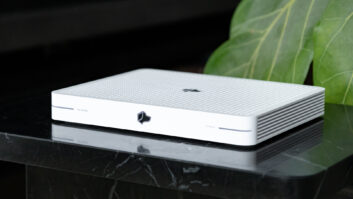
Just two-and-a-half years ago, Josh.ai launched Josh One, its entry-level controller designed for smaller projects up to 100 devices. According to Josh.ai, Josh One is “the first AI-powered home control platform for customers seeking a modern app-based experience.” Since then, Josh.ai has updated the Josh One with an entirely new, smaller form factor that resembles an Apple TV.
According to Casey Levy-Tulloch, Josh.ai’s director of business development, “The new Josh One was redesigned to fulfill the vision of what we believe an entry-level control processor should offer with an ultracompact form factor and increased versatility so that everyone can live smarter. Whether it is mounted in a technology rack or placed in a media cabinet, installation is made easy thanks to USB-C power and Ethernet data connections. Under the hood, the updated Josh One is equipped with a 4-Core ARM processor with speeds up to 1.5 GHz.”
At its competitive price point, the Josh One is easy to justify on nearly any project, and when used with the Josh App, is capable of providing a full control experience without breaking the budget.
A “device” in Josh.ai parlance is anything controllable, such as a light load, switch, shade, audio zone, motion detector, camera, thermostat, display, etc., and getting over a hundred devices can happen quicker than you think. For bigger projects, two Josh Ones can be paired together to support up to 200 devices, and for the largest jobs, a Josh Core controls up to 500 devices, and two Josh Cores can be paired to support over 1000 devices.
For customers looking for hands-free voice control — and once you start using it, this will be nearly everyone — a Josh Micro far-field microphone can be added to either a Josh One or Core system. A Josh Core is required to integrate the incredibly small Josh Nano, a quarter-sized far-field microphone that is designed to disappear into its surroundings. Josh Nano can even be integrated into a special dual-gang Lutron screwless wall plate for a truly custom finished look.
For traditional in-wall control, Josh.ai offers 8-inch and 10-inch touchscreens, both with built-in tap-to-talk voice button to trigger the full Josh.ai voice control experience.
Josh.ai has also simplified its software pricing model. In the past, there were base charges, and then a customer could separately add in voice control with JoshGPT (Josh.ai’s intelligent assistant) if desired. Now every software plan features the “full” Josh.ai experience, with app, voice, and JoshGPT included. Software plans start at $20/month for a single Josh One, and can be billed annually, for five years, or a lifetime license. I inquired, and Josh.ai makes it easy to swap new hardware in (if needed) under an existing software plan, meaning a lifetime license would be transferable.
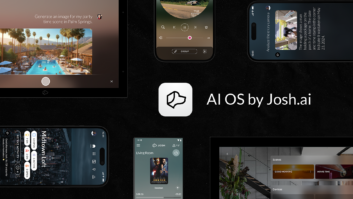
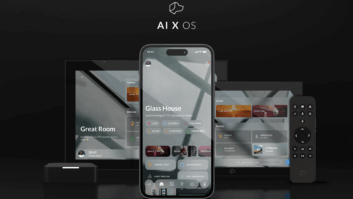
Along with access to Josh.ai’s custom software, this subscription also includes regular free updates and upgrades automatically pushed to your system. Notably, Josh.ai recently rolled out AI X OS, a massive update and reimagining of its mobile app. The new app offers a lot of user customization to the look and layout, presenting your home in simplified panes that make it quick and easy to see — and control — what is happening at a glance.
It’s this custom-developed software that truly makes Josh.ai so different and powerful. Josh.ai’s Natural Language Processing and machine learning take the complexity and custom programming out of the install, instead intuiting what a user wants by how they want to ask for it. The system can also handle multiple requests like, “Hey, Josh, turn off the lights, close the shades, and play some jazz in the kitchen and dining room.”
While Josh.ai can control many third-party devices natively, it also works with professionally installed automation systems by connecting over the network to integrate with Lutron, Sony, AVPro, Crestron, Control4, and many more.
Josh.ai also has an extremely robust, helpful, and well-written online resource center for learning about nearly any aspect of deploying systems. You can look at both support.josh.ai and josh.ai/stories for a host of articles.
If you’re curious about Josh.ai’s logo — a dog’s head in profile — here’s the official answer: “Josh is a home’s best friend. And like a dog, Josh is intelligent, responsive, and learns his owner’s commands. While other smart home control systems only know one trick, Josh combines all aspects of smart homes into one friendly, well-trained responder. Josh is your companion, and always happy to see you come home.” Who wouldn’t want that in their life?
Why Edge?
Josh Edge is Josh.ai’s first foray into a handheld remote control (previously, Josh.ai established a partnership with AVA to incorporate their remotes), so I asked Josh.ai’s CEO and co-founder Alex Capecelatro why the company felt the time was right to come to market with the Edge.
“Dealers kept asking us for it. They wanted something simple, without a screen, with great battery life, strong reliability, and no learning curve,” Capecelatro said. “The remote is still one of the most important interfaces in the home. It is the thing people reach for every day, yet the industry has spent years making remotes more complicated. More buttons, more menus, more screens, more things to learn. We thought there had to be a better answer. Josh.ai has always been about removing complexity from technology, and Edge takes everything we have learned about intelligent home control and reduces it to its simplest form. You pick it up and immediately understand it. There is nothing to teach and nothing to figure out. It simply lets you control the room. That sounds obvious, but the industry has struggled to deliver it.”
When asked about Edge’s markedly different and simpler design, Capecelatro remarked, “We have always believed that technology in a luxury home should look beautiful, feel great, and become part of the architecture rather than compete with it. Most remotes still look and feel like pieces of AV equipment. Edge was designed as an object that belongs in the home. Every decision, from the shape and weight to the buttons and charging base, was made around how it feels to live with every day. We also believe the future is not about adding more controls. It is about removing everything that is unnecessary. Edge gives you the physical controls you use constantly, while voice and intelligence handle the complexity behind the scenes. It is simple because the technology underneath it is sophisticated, not because the product is limited.”
Capecelatro said that Josh One and Edge are opening more project opportunities for Josh.ai that may not have started with their platform in the past, but he shies away from calling these “entry-level” products.
“Entry level often implies compromise,” Capecelatro stated. “Edge and Josh One deliver the same core experience and the same design philosophy whether they are installed in one room or across a massive estate. We are seeing Edge used as an approachable starting point in smaller projects, but we are also seeing it deployed throughout some of the largest and most complex homes. It works for a single room, a whole home, or a mega-compound. The only real difference is how many you deploy.”
On Josh.ai’s philosophy regarding smart home technology, Capecelatro added, “Great technology should not require someone to choose between simplicity and scale. The same experience should work whether you are controlling one room or an entire property. That is where we think the industry needs to go. Technology should become easier as it becomes more powerful, not harder. Edge is a meaningful step in that direction.”
First Impressions
Unboxing the Josh Edge and Josh One feels like a decidedly Apple experience. The products are smartly packed and presented, using just the requisite amount of material needed to make sure it arrives safe and perfect for its unveiling.
Now, I’m aware that this is the third time I’ve made a Josh.ai-to-Apple comparison in this review, but I do it with the highest respect to both companies. Apple is renowned for its experience, and that starts with the unboxing, continues with the industrial design, and ultimately culminates in the product use.
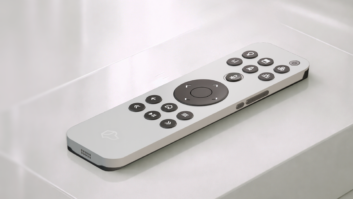
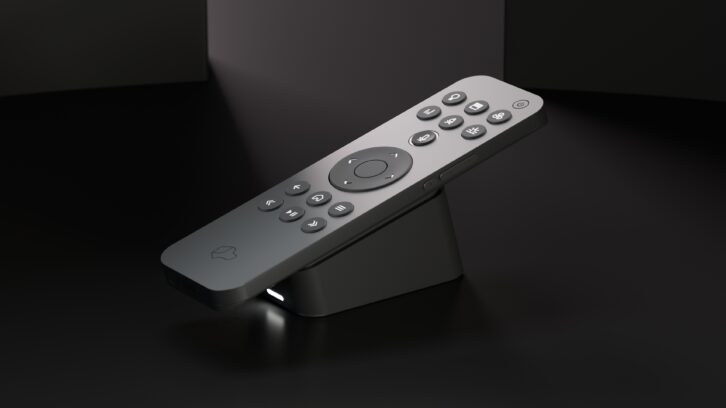
Pulling the remote from its packaging, it immediately feels luxe. Milled from solid aluminum, the remote is slightly cool to the touch with smooth, contoured edges and just the right amount of heft. At 6.16 x 1.78 x 0.35 inches (L x W x D), the Edge is small by “modern” remote standards, but it fits comfortably in the hand, and the shorter length makes it easy for your thumb to reach any of the buttons.
Capecelatro said this was very intentional: “We obsessed over the details because those details become the experience. The weight, the materials, the battery life, the responsiveness, the feel of every button, and the way it rests on the charging base all matter.”
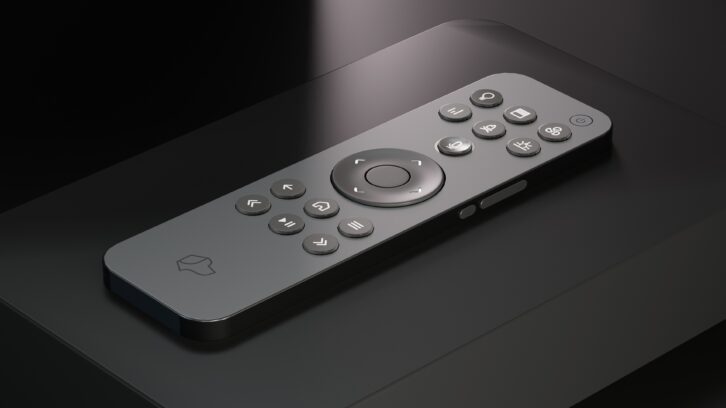
Speaking of buttons, you quickly notice that, for a full-featured remote, the Edge doesn’t have a lot of them. There are eight at the top, including the microphone trigger and discreetly recessed power, a D-Pad in the center, and six more at the bottom. The upper-right side of the remote has three more for volume and mute.
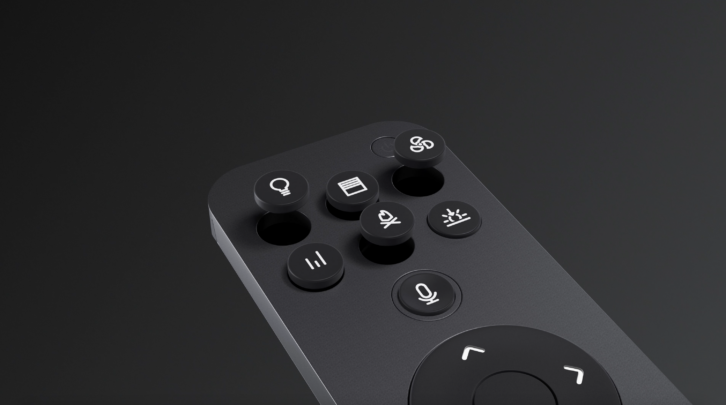
For lack of a better term, I’ll call the top six buttons activity buttons and the bottom six control buttons. The remote ships with icons for the six activity buttons, including lights, shades, music, sunrise (room on/good morning), moon (room off/good night), and video. Josh.ai offers more than 75 different buttons to personalize the experience, and these can be purchased in category packs (27 buttons) or device icon packs (6 icons). A small Josh.ai Dog logo tool is included with the Edge to help remove buttons.
Josh Edge’s base station requires just a USB-C cable for power. The remote docks securely to the base for charging via a strong magnet that creates a solid and tactile connection without having to wonder if it is on correctly.
The newly designed Josh One is a good bit smaller than the previous and no longer features the ability to use PoE for power, requiring separate USB-C power and Ethernet data connections. According to Levy-Tulloch, “We made this decision to ensure supportability and reliability for every project. By adding power and Ethernet connection, the new Josh One is a solution for any client without requiring additional networking equipment to provide PoE.”
Setup
I covered the full setup and programming of a Josh.ai system in my original review of the Josh One and Micro, so I’m not going to rehash that entire experience here, but here’s an abridged version. New dealers will take Josh.ai’s online training courses and pass a Technical Certification Exam. These classes not only provide a good overview of Josh.ai hardware and what it can do, but also how to navigate system configuration in Josh.ai’s online portal and perform system customizations. There is also an online sales training course.
Josh.ai stands on its own as an automation system and directly controls a whole host of products, like Sonos and HEOS audio systems, Sony, LG, and Samsung TVs, Kaleidescape, Roku and Apple TV streamers, and a slew of AV receivers from the main brands. Josh.ai can also layer on top of other control systems, and this is how I integrated it with Control4, Lutron, and Hunter Douglas devices already in my home. Deploying Josh.ai is quick and easy, requiring very little configuration to be up and running.
Once connected, Josh.ai scans the network and discovers devices it can work with. For my Control4 system, I installed the Josh.ai driver into my C4 project, “authorizing” it to work with my system. Some other devices — Apple TV, Crestron Home, Dish, HEOS, Lutron, Sonos — require authorization to work, but the Josh.ai portal walks you through the process.
Once authorized, Josh.ai goes out and pulls in all the information from your project, which not only includes all the lighting, fans, and shades, and AV zones, but also all the rooms and areas, efficiently saving you from that work.
Since I had a fully functional Josh.ai system already using the original Josh One, I simply added the new One into my project, and it started working.
Adding the remote took only slightly more work. Once the base station was connected to power, its LED went solid blue, indicating it’s in setup mode. You then open the Josh App, go to Settings > Device Setup > Josh Edge. The LED will then turn purple to confirm you’re connected to the correct device, then walk you through connecting to the local Wi-Fi network (802.11 a/b/g/n/ac/ax). After it connects, you select which room/area the Edge will be used in.
The base communicates to the Josh.ai processor over the network via Wi-Fi while the Edge communicates to the base via Bluetooth 5. If you’re an enemy of light pollution as I am, you’ll love that you can disable the base station’s LED.
You can easily reconfigure any of the six activity and power button in the Josh App, or via voice control (i.e., Set double tap for the top left button to toggle the kitchen lights) to your liking, with separate commands available for single press, double-tap, and press-and-hold. With this, you turn seven buttons into 21 separate commands. Of course, you — or your customer — then need to remember what all of these do, so be judicious in your programming.
Because there are so few buttons, I used the programmable activity buttons for quick access to frequently used commands that didn’t have any button mapping. For example, a single press on video watches Apple TV, a double press watches Dish, and a press-and-hold sends the DVR command to my Dish Hopper. A single press of the Moon watches Kaleidescape, and a double press sends the Info command to my Kaleidescape Strato.
Currently, you cannot change any of the programming or functionality of the lower six buttons, which come default programmed as back, home, menu, rewind, play/pause, and fast forward. This was very intuitive and worked well for the most part, but it would be great to have access to double-tap and press-and-hold programming for these buttons, or to be able to repurpose them. For example, I’d rather have the rewind and FF buttons act as chapter skips on my Kaleidescape, and as skip back/forward on my Dish. Levy-Tulloch indicated that these could be made user-configurable “down the road if needed.”
How your customer uses their remote and system will likely determine which button icons you may or may not need. (The icons and locations can be reassigned in the Josh App.) For example, I use the Edge primarily as the main controller for my living room AV system and almost never use scenes — Good Morning, Goodnight — from my remote, so more device icons would likely work better for me.
There is no limit to the number of Edge remotes that can be added to a system, and Josh.ai components don’t count toward a processor’s device limits. My suggestion would be to add an Edge remote as the primary controller for every room that has an audio or video zone.
Performance
There’s no sense beating around the bush; I loved the Josh Edge remote, and it quickly became my go-to daily driver remote. Really the only time that I would revert back to one of my Control4 Halos would be when the Edge needed recharging or if I wanted to switch rooms, say going from Living Room OLED control to controlling my projector.
Regarding the battery, Josh.ai claims it “should last for months off the charger” if not in use and offers weeks of battery life “with moderate use.” We had an unexpected trip that lasted nearly two weeks, and the Edge was still good to go when we returned, and I’d say we easily get more than a week of battery with daily use. Certainly, way more than today’s typical smart remotes.
While Josh.ai gives you a few ways of checking the battery life — you can look in the app or just ask what the battery status of the remote is — this isn’t something I’d typically do proactively, so inevitably I wouldn’t find out the remote was dead until I’d grab it and try to use it. As elegant as the rest of the system is, it would be really nice if the system would notify you either via a push notification, red light at the base station, or even voice announcement when the remote gets down to say 15%. Levy-Tulloch said, “I agree the app should ping you when the remote battery is low. It’s all software so if we don’t do it now, we will soon.” Also, the battery is not replaceable, so when it’s gone, the remote is EOL.
Review: SurgeX Axess+ and DisplayPak Connected Surge Protectors
If you’re prone to misplacing your remote, you can trigger a tone either by asking another Josh.ai microphone — “Hey, Josh, where’s the Edge remote?” — or triggering it in the app. Plus, the tone is loud enough that you should be able to hear it even beneath a couch cushion.
Ergonomically, I really liked the fit and feel of the Edge; it just sits nicely in your hand, and the buttons have a nice amount of resistance and click to let you know the command took. Also, all the front buttons are fully backlit in a nice crisp white, and I daresay no one will have trouble reading the buttons in any lighting condition. (Of course, this is adjustable if you prefer it dim or even no backlight.)
From a design standpoint, I love the remote, but if I had one nit about the button layout, I don’t love the volume buttons on the side. They are a little more awkward to access, and I find that I can’t really use my thumb and have to regrip the remote to get a good hand position to get enough pressure from my index finger on the volume buttons, holding the remote in a pincer grip with thumb and index finger. If they were lower on the remote, I might be able to press them with my thumb, but it’s a bit of an awkward reach for me right now. I’d rather the volume buttons be on the front at the sides of the microphone button, but this is definitely not a deal breaker and something I’m adapting to.
With a Josh.ai microphone and speaker essentially at my fingertips, I found myself using the voice control features quite a bit. Whether that was asking to turn fans or lights on/off, asking it to tune to a channel, streaming service, or start playing music, or asking JoshGPT some random question (“How bad is it to sit in the front row of a 70mm IMAX theater.” TLDR: Bad. “Are microfiber towels good for absorbing water?” Yes, excellent in fact.), with the mic right there, I interacted with Josh.ai more frequently.
The Josh Edge remote is a smart reimagining of what a modern system controller should be: simple yet powerful. By stripping away the clutter and incorporating essential buttons with Josh.ai’s powerful voice control, Edge delivers a daily-driver experience that feels modern, intuitive, and genuinely enjoyable to use. For anyone wanting a remote that simply works and feels great every time you pick it up, Edge sets a new benchmark.
Product Specs:
- Configurable smart system remote with voice control microphone/speaker
- Seven configurable buttons with more than 75 icon options (sold separately)
- USB-C (5V 2A) and RJ45 for power and network connection at base station
- High-performance wireless architecture with Wi-Fi (802.11 a/b/g/n/ac/ax) and Bluetooth 5
- IPX4-rated for splashes and light moisture
- Compatible with systems powered by Josh Core or One processors
- Device control performed locally and voice processing computed on the edge
- Dimensions: 1.78 x 6.16 x 0.35 inches (WxHxD)
- Weight: 0.17 pounds