Kudos: Best protection you can get; fantastic amount of analytics and configuration options
Concerns: No way to dim front LEDs; outlets spaced closely on Axess+
If you’ve been in this industry a while — at least going back to the early 2010s — then you might recall the amazing booth demos that SurgeX put on at CEDIA Expo. In hindsight, I believe this is the closest thing to AV Torture Porn our industry has ever reached. (I’ll allow that the CEDIA Amp Toss event was a close second.)
You’d be walking down the aisles on the show floor, and then you’d hear a sudden, jarringly loud WHAAAP! which was then often followed by some nervous laughter or even cheering. If you were close enough to the SurgeX booth, then you might notice a thin whisp of smoke and catch that unmistakable aroma of toasted electronics.
Back in the day, SurgeX used to bring this large transformer to their booth that they would slowly charge up to 6000 volts. The energy build-up to 6000 volts took a bit of time, building this delicious bit of palpable tension among the onlookers, worthy of the Willy Wonka “The suspense is killing me…” meme.
Why 6000? Besides just being a high amount of voltage, that is also what the IEEE (Institute of Electrical and Electronics Engineers) determined to be the maximum surge voltage that would be experienced within a building (also, 3000 Amps and 90 Joules of energy). But if 6000 doesn’t sound like a lot compared to the energy in a full lightning strike, the math for a typical 20-microsecond surge would work out to 4.5 Mega-Watts of peak power!
Once the transformer hit 6000, a green light would come on, and the SurgeX employee would press a button, and there would be the loud WHAAAP! followed by a bright spark as the violent burst of electricity was sent into the SurgeX device plugged into the transformer. The video monitor protected by the SurgeX never showed as much as a flicker or dropped frame.
This would happen for a few discharge cycles — the SurgeX protector just shrugging off the 6000-volt surges like they were love taps — and then the SurgeX rep would ask those gathered around if they’d like to see how a competitor’s surge protector faired under the same conditions. This was often asked in a conspiratorial, “You know you wanna see it…” manner that hinted the outcome would be entirely different.
Once the competitor’s sacrificial lamb was connected to the transformer, the energy would rebuild, and then the discharge would happen, and after just a single blast, the surge’s display would show things like “Fault Condition. Transfer Relay Weld” or just go dark, often with a wimpy Pop! followed by wisps of gray-black smoke roiling out of their backs. And then the smell, the burnt electronics of the circuit boards and sacrificed Metal Oxide Varistors (MOV) that are used by a majority of other surge protectors.
If you came by the booth near the end of the day, there would be this pile of fallen protectors that looked like the technological equivalent of the Battle of Thermopylae.
As you can imagine, that left quite an impression, so when SurgeX offered to let me review one of its products — the XN120, now called the PF-420 — a branch circuit protector designed to protect a full room at the panel/circuit level, I was eager to try it.
That was installed back in 2011, and in 14 years I haven’t had any surge-related issues on the four circuits connected to that device. Coincidence? Maybe. But I do live in one of the lightning capitals of the country, and electrical storms and surges are common here.
This lengthy preamble is all to give a bit of backstory to my experience with SurgeX and tell a bit about their products. In truth, it’s difficult to test a surge protector in the wild. I can’t summon a surge or lightning strike and then definitively say, “Yep, all of the connected gear is fine and the unprotected gear is dead.” Now, we did have a tree in our front yard struck by lightning after the XN120 was installed, and none of the connected gear was damaged from the electricity. (A modem, router, and NAS died from a surge on the cable and Ethernet line.)
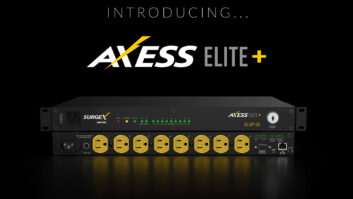
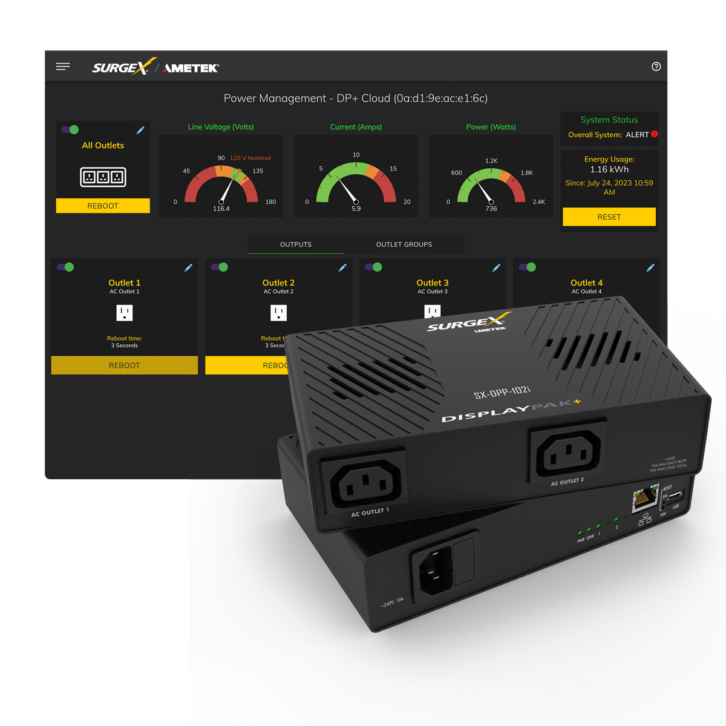
But I chatted with SurgeX at this past CEDIA, where the company released two new products: the DisplayPak+, a compact, 2- or 4-outlet Wi-Fi-enabled protector, and the Axess ELITE+, the company’s flagship rack-mounted power management solution. Even more exciting, CEDIA was also the official launch of SurgeX CONNECT, a cloud-based control platform that will enable SurgeX dealers to monitor all of their installed devices across multiple sites from a single dashboard. Connect will not only provide the kind of outlet control offered by others, but will also offer a host of analytics and power monitoring data that can be used to diagnose power-related equipment issues at a jobsite.
First Impressions
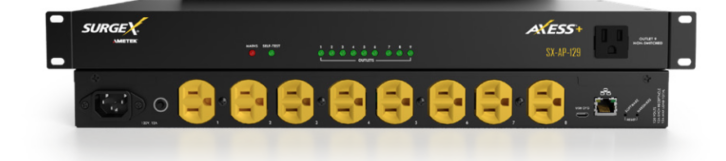
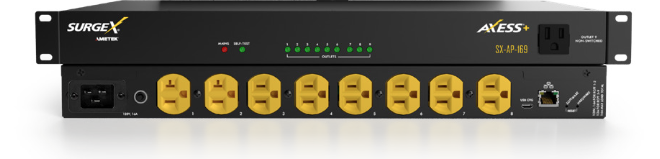
While I requested a review sample of the new Axess ELITE+, they actually sent the SX-AP-129 Axess+, not the ELITE+ introduced at CEDIA. They offer identical power protection and are functionally very similar, but, at literally twice the MSRP ($2859 for the ELITE+ versus $1429 for the Axess+), the ELITE+ does have a few additional cool tricks tucked into its 12.4-pound chassis that I’ll mention later. They also sent the new SX-DPP-104, the 4-outlet version of the DisplayPak+.
With a metal chassis and weighing over 10 pounds, the Axess+ feels solid. The front panel has no controls, rather multiple LEDs to indicate power and status of all the connected outlets, as well as a front power connection. If you needed a quick power connection in the rack — say for a laptop when programming — this would be handy. The rear has eight NEMA (National Electrical Manufacturers Association) power connections, a detachable power cable, a resettable fuse, a 10/100 Ethernet connection, and a Micro USB connection. There are also two pinhole buttons for performing either a software or hardware reset. The system has a total AC load rating of 12 amps.
My only real concern with the layout was that the outlets on the rear panel are a bit close together. If you’re connecting traditional power cords, this won’t be a problem, but if you have any 90-degree or angled plugs, amps with super beefy plugs, or are connecting power supplies, you might have some overlap.
Like all of SurgeX’s component-sized units, the Axess+ can be rack-mounted using the included ears.
The DisplayPak+ is really a miniaturized version of the Axess+ with all of the same connections, albeit fewer of them. The front of the unit has the power LED indicators, plus an additional LED to show Wi-Fi link status, along with the detachable power cable, Ethernet, Micro USB, and pinhole reset buttons, with the four NEMA power connections in the back. Smartly, the two outside rear outlets are rotated 90 degrees away from the two middle connections, meaning you should have plenty of space even with power supplies.
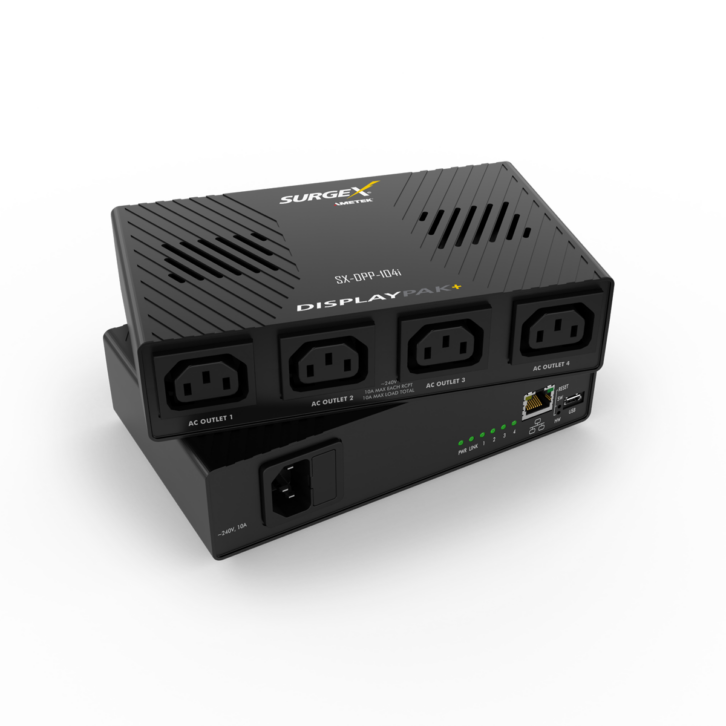
At just 7.09 x 1.73 x 4.23 inches (W x H x D), the DisplayPak+ would easily install inside a VersaBox-style enclosure, if it couldn’t just slip behind the display itself. It can also be wall-mounted using the included bracket.
The only documentation included with either unit is a small card with a QR code to scan for the instruction manual/quick start guide, with a separate QR code to connect to the SurgeX Connect site. The 29-page online user manual for the DisplayPak+ is very thorough, detailing every feature and setting.
SurgeX Models and Protection
There are quite a few different models in the SurgeX lineup, so choosing the correct model might feel daunting. However, it really boils down to the form factor required — rack-mount, flat/wall-mount, vertical, branch/circuit — the voltage, 120 or 240, the amperage, 15- or 20-amp, the number of outlets needed, whether you want remote access/monitoring, and the level of protection.
Models with a “+” designation are compatible with the new CONNECT platform, so start there if you want remote access/monitoring.
As mentioned, the Axess Elite+ offers some specific bells and whistles not featured on the Axess+. This includes two relay outputs, a contact closure input, an included temperature and humidity sensor, and RS-232 serial control. This offers a variety of configurable options, such as turning on a rack fan if the system gets too warm or turning the system off if an alarm panel sends a trigger. The ELITE+ is also scalable, allowing you to connect and manage up to 16 units from a single interface, and has a front-panel locking on/off switch. For what it’s worth, the ELITE+ also weighs 22% more (2.2 pounds) than the Axess+.
While every other SurgeX connected product monitors energy usage based on all connected devices, the ELITE+ is unique in that it offers monitoring separately for each outlet. If you have a customer who really likes to get granular on system usage and performance, the ELITE+ will give them data and insights for every piece of connected gear in the rack.
To understand how SurgeX protects electronics from surges, it’s helpful to have a basic understanding of how traditional surge protection works, which relies on MOV technology. These release the majority of surge energy back to the ground, which can be okay for basic protection, but with modern electronics utilizing microprocessors that reference the ground for signal clocking, this ground contamination can cause lockups, reboots, and other system gremlins.
The other issue with MOV technology is that it degrades over time. Imagine a health meter in a fighting game; each hit drops that life level down. However, unlike a game where you can just check your remaining level, there is no way of knowing how much life the MOV has left, and eventually it will fail, leaving equipment unprotected and users unaware. Also, protectors relying on MOV technology can be overwhelmed by massive surges, as mentioned in the opening.
When it comes to protection, SurgeX essentially provides three levels: good, better, and best.
At the good level is Multi-Stage protection that uses non-sacrificial MOVs and gas-discharge tubes to suppress the surge and clamp any transient energy, allowing a harmless remnant of energy to be passed to equipment. This is the technology used in the DisplayPak+.
At the better level is Series Mode protection that SurgeX brought to market in 1995. This uses a surge-suppression circuit that filters high-frequency surges and stores low-frequency energy in capacitors, releasing it gradually without ground interference. SurgeX described this as working “like the champagne tower at a wedding. [It] clamps the surge and slowly releases the energy.” This is also non-sacrificial, meaning it offers an unlimited service life and consistent power delivery.
At the best level is SurgeX’s patented Advance Series Mode that utilizes inductive/capacitive circuitry to totally eliminate, rather than suppress, surge energy. This uses air core inductors that work along the same principle as noise-canceling headphones, along with a clamping board to eliminate surge energy entirely up to 6000 volts without any let-through voltage or ground contamination, and these devices are rated to withstand up to a thousand 6000-volt surges. This is the surge protection found in the Axess+ and ELITE+.
Additionally, SurgeX products include additional protection such as Catastrophic Over/Under Voltage Shutdown, which automatically cuts power to equipment if voltage is detected outside safe operating ranges; EMI/RF (Electro-Magnetic Interference/Radio Frequency) filters to eliminate noise on incoming power; and Inrush Current Elimination, a “soft turn on” of devices that protects electronics from the momentary inrush of current that can occur when electronics are first turned on.
SurgeX also offers a variety of UPS solutions with zero transfer time to guarantee mission-critical equipment remains up and running, or allows time for a safe system shutdown during a lengthy outage. One nice thing is that, in the event the internal battery(ies) fail, the UPS goes into bypass mode, simply passing power through to continue powering connected devices.
The company says it has a “PB&J” philosophy for effective power design: Protect, Backup, and Justify. Connect is the cornerstone of the Justify component, “providing advanced insights into power analytics. It helps partners demonstrate what is working, what isn’t, and where improvements can be made.”
Setup
I installed the Axess+ in my main rack, where my “best” gear is located. I connected a Trinnov Altitude 16, two multichannel Marantz amps, two powered subwoofers, a Sony BRAVIA 8 laser projector, a Kaleidescape Strato, and a 16-channel Triad amplifier. This was also in close proximity to my main 24-port network switch, making for a simple Ethernet connection.
I installed the DisplayPak+ in my testing room and connected a Sony LED TV, Klipsch Flexus CORE 300 soundbar, Kaleidescape Terra Server, and Kaleidescape 3U Premiere Server. I figured the many DisplayPak+ installs would be wireless, so I went with a Wi-Fi connection here.
You can either use a network IP scanner or look at network connections in your router to find the IP addresses of the SurgeX devices, or you can download the Ametek device discovery tool. Since it wasn’t on the network to be discovered, I used the mini-USB cable to connect to the DisplayPak+. The web server is always available through the USB port at https://169.254.10.100, which is handy if you don’t have full access to the network.
Also Reviewed by John Sciacca: Stealth Acoustics LineaRadiance 430 Invisible Speakers
Once you log into the device’s local web GUI, you land on a homepage that gives a quick snapshot of current operation, showing Line Voltage (Volts), Current (Amps), and Power (Watts), as well as a quick system status (overall system, surge protection, voltage level), and total energy usage, since the device was connected to power. (This can be reset at any time.) You also see the status of the individual power outlets, and you can easily toggle them on/off, reboot them (with adjustable reboot times per outlet), and rename them. There is also a master button to reboot or power on/off all outlets.
To the left of the GUI are a host of setup and configuration options, including access to real-time and historic power readings, as well as time-stamped events.
Going into the Device Setup tab, you can adjust things such as the device name, nominal voltage, and frequency settings (typically 120 V and 60 Hz in the States), set a power-up delay time, and set how it should respond on Power Up or Shutdown Clean, either returning to the initial outlet state or running a sequence. The Outlet Configuration tab allows you to name, set reboot time, and set the initial state the outlet will be during a startup or after a shutdown. Outlet Group allows you to define multiple outlets you can control at once, and Day/Time settings let you set how to retrieve the time and zone.
Network settings allow you to set a static IP if needed, and with the DisplayPak+, choose whether to use Wi-Fi or not, scan for and select available Wi-Fi networks (2.4 GHz only), and enter the security credentials.
If you don’t want your client to have full administrator-level permissions, you can create additional user logins and selectively give them the ability to configure triggers, device control, network settings, software updates, and add users.
You can create sequences, which are a set of actions that are performed in a specific order and with a specified delay time between each step. You can select which outlets you want to turn on/off or reboot, in what order, and how much delay to take between each step. Using sequences avoids manually performing each action or turning each outlet on or off individually.
Another very cool setting is Triggers, which defines event logging parameters and allows configuration to automatically control and protect connected equipment. There are three trigger types: Threshold with Samples, AutoPing, and Schedule.
Based on each trigger, you can define what to do when entering and clearing the alarm state, with options for doing nothing (logging the event), powering On/Off/Reboot specific or all outlets, running a sequence, entering shutdown state, or clearing shutdown state.
An AutoPing trigger lets you ping a specific IP address and determine how many failed pings to initiate an alarm, followed by how many successful pings to clear it. Schedule allows an event to happen one time, daily, weekly, monthly, or annually at a specific time, say rebooting a modem every day at 4:00 AM.
You can create Threshold with Sample triggers for when Line Voltage, N-G voltage, Current, Temperature, Frequency, Average Power, Crest Factor, or Power Factor fall outside of determined ranges, and how the system will respond when it exceeds or goes below your defined limits, and then what it does when the range is back in the green. You can also set how many faults are needed out of how many samples before the alert is triggered, so that a temporary blip doesn’t reboot your system.
Admin utilities let you update the firmware, backup/restore a configuration file, and perform a factory reset or a soft reboot.
The last important configuration is in the Cloud settings, which is what connects the device to the SurgeX Connect site. You first need to create a SurgeX Connect account, and then register it in Cloud Settings. For remote control capability, you need to enable device control under the device configuration settings. This whole process takes about a minute; once performed, it will display the connected time and successful cloud certificate status. Should you need to de-register a device, there’s a tab to do so.
Need more control? No problem. SurgeX offers loads of control drivers available for free download at its website. This includes AMX, Crestron Home, Crestron SIMPL, ELAN, Extron, RTI, Control 4, Q-Sys, and URC. Once integrated with your control system, you can execute custom programming based on a variety of events reported by the SurgeX product.
Performance
As mentioned at the outset, it’s difficult to test the performance of a surge protector. We never had any surge events, at least that I’m aware of, while it was installed, and my gear didn’t have any lockups or issues while it was connected to the Axess+.
I can’t say as much for the DisplayPak+, as I’m pretty sure the unit I received might have been janky right out of the box. It kept falling offline even though it was just feet from my WAP. It repeatedly dropped the connection even when connected to the Mini-USB cable. It factory-defaulted itself once, losing all settings. And then, after a hard power cycle to reboot it, it no longer powered on its four outlets. Stuff happens, and I think I just got a bum unit. Unfortunately, there wasn’t enough time for SurgeX to send a replacement before deadline.
What I can talk about is the performance of the Connect site and all of the data points collected.
Remotely via the Connect site (surgexconnect.com), you have access and control of all your installed and registered units. You can arrange them by jobsite, making it easy to keep track of all your projects and also create additional users to give them access to specific devices, as well as choose to have the system send warning or informational emails to clients.
Currently, you can do everything remotely that you can perform locally except for changing network settings and updating firmware; however, SurgeX says remote firmware updates will be coming.
The really cool bit is the pool information the system records, gathering 31 different metrics — including average power, line current, line frequency, crest factor neutral – ground voltage, neutral – ground voltage, line – neutral voltage, power factor, crest factor line – neutral voltage, and crest factor current — and taking timestamped readings six times per minute. (This can be adjusted from every two seconds to just once per day.) Over a four-day period, this resulted in over 30,000 readings. This data can be exported into an Excel file, where it is easily sorted, allowing you to track and locate potential power issues on a jobsite. SurgeX suggested you could plug that data into AI and have it analyze the readings to find anomalies in the power line.
Also Reviewed by John Sciacca: Sony VPL-XW6100ES BRAVIA 8 4K Laser Projector
By this point, we all know the benefits of IP-enabled power devices, which can automatically reboot outlets to power-cycle the network on loss of connection and allow remote system reboots to hopefully eliminate a truck roll. With SurgeX Connect-enabled models, you not only have access to all of this, but you also get best-in-class power protection and filtration, and industry-leading metrics that provide visibility into what is actually happening with the power. When a client’s system protection, reliability, performance, and longevity are important, SurgeX equipment should be a part of the conversation.
800-654-9721; AMETEKESP.COM
Product Specs: Axess+ SX-AP-129
- Patented Advanced Series Mode surge elimination technology with zero let-through voltage
- Nine individually switchable IP-controlled NEMA outlets
- Remote turn on/off, power cycling, and sequencing
- Advanced scheduling, AutoPing, and threshold-triggered events
- Remote power management and a full suite of power analytics
- Integration with third-party control systems, including AMX, Crestron Home, Crestron SIMPL, Elan, Extron, RTI, Control 4, Q-Sys, and URC
- Lifetime warranty on SurgeX product; five-year warranty on connected products
- Dimensions: 17.4 x 1.73 x 9.85-inches (WxHxD)
- Weight: 10.2 pounds
DisplayPak+ SX-DPP-104
- Dimensions: 7.09 x 1.73 x 4.23-inches (WxHxD)
- Weight: 1.2 pounds