Kudos: Sound and Active Noise Canceling terrific on both WF and WH MX6 models; LinkBuds Clip incredibly comfortable; Sound Connect app offers tons of configuration options
Concerns: Finding the perfect fit with WF tips
According to studies, people buy a new pair of headphones on average every two years. Adults aged 19-29 years listen to headphones nearly eight hours per week, with 88.6% of adolescents listening to headphones nearly every day. This is followed by those 30-49 years at 5.5 hours/week, with 50–79-year-olds clocking in at 5.2. And when ranking the most important features when choosing new headphones, sound quality ranked #1, with comfort #2.

The next generation of audiophiles is out there, and the majority of them are listening to music on headphones. This also means that your AV customers — who already value performance and your opinion — are also likely listening to headphones, whether at home, work, the gym, or while traveling.
So, why aren’t you offering headphones? They can be an easy add-on sale that creates another touchpoint with you and your clients, cementing you as the go-to source for all things AV, and they require virtually no after-sales care. That’s a total win-win-win!
If you are a Sony dealer, the company just dropped three new headphone models, and all fit a different listening and lifestyle choice.
In-ear, Over-ear, Open-ear
Sony has long been one of the leaders in wireless, noise-canceling headphones, and with these latest iterations, we are now on the sixth generation of both its highly regarded WF-1000XM6 wireless in-ear buds and WH-1000XM6 over-ear headphones. Brand new here is the LinkBuds Clip, which are an open-ear design that clip onto your outer ear, kind of like an earring.
Some people have strong feelings about in-ear versus over-ear, but since Sony has upgraded its flagship wireless offerings in both these categories, you won’t have to pick last-gen tech to get your preferred style. And while the XM5s were already stellar performers, the XM6 models all receive notable upgrades.
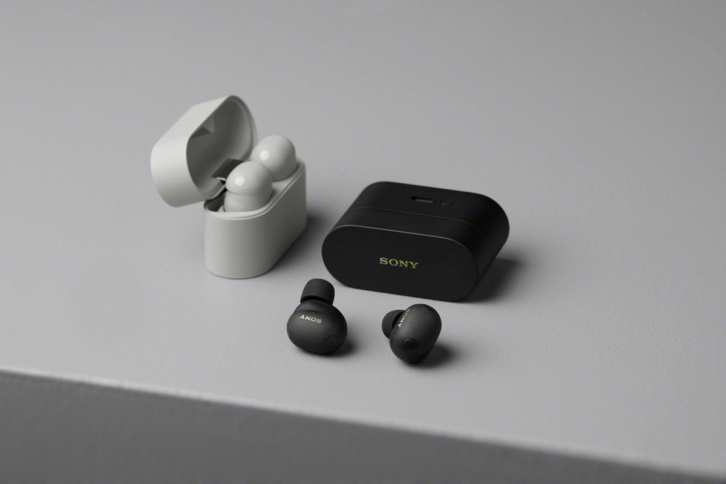
With the in-ear WF Series, Sony made upgrades to improve noise cancelation, sound reproduction, call quality, and comfort. Sony upgraded just about everything: a new QN3e processor that’s three times faster with 25% better ANC, eight microphones instead of six, improved adaptive noise canceling, redesigned drivers for smoother sound, better call performance with AI noise reduction and beamforming, and a new shape that boosts both comfort and seal.
Additionally, the XM6 features a 1.5-times larger Bluetooth antenna for better connectivity. The phones deliver up to eight hours of listening on their own and 24 hours with the case, and can provide an hour of play time with a five-minute charge. Also nice is that, in addition to USB-C charging, the case features Qi technology for easy wireless charging. The phones come with four different sizes of ear tips to help find the ideal fit. These are currently offered in either Black or Platinum Silver colors.
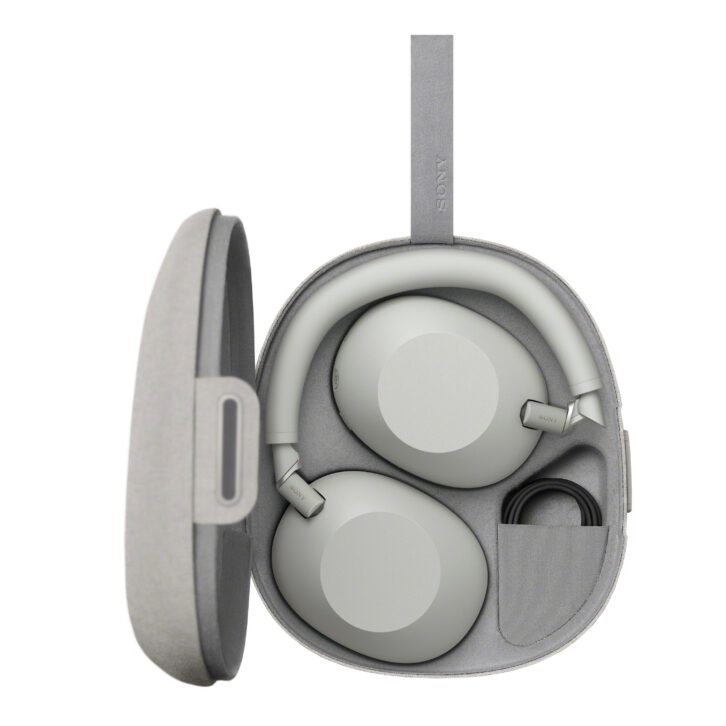
The on-ear WH Series are also powered by the QN3 processor, which is seven times faster than the XM5 version, and upgrades to 12 microphones versus eight with new Adaptive NC optimizing. To improve call performance, there are now six microphones (versus four) with AI beamforming. The XM6 retains the 30-hour battery life with NC on, and gives up to three hours of operation with just a three-minute charge; however, the XM6 now allows simultaneous listening and charging. The phones also have a new foldable design, making them more compact for travel, feature Sony’s 360 Reality Audio upmix technology for spatial sound from 2-channel sources, and provide a new touch-to-mute operation. The phones include a travel case and mini-to-mini headphone cable. In addition to Black and Platinum Silver, the WH-series are also available in Sand Pink and Midnight Blue colors.
The packaging of both the WF and WH models is made from 100% paper materials, utilizing Sony’s proprietary paper, Original Blended Material, an environmentally conscious paper made from bamboo, sugarcane fibers, and post-consumer recycled paper.
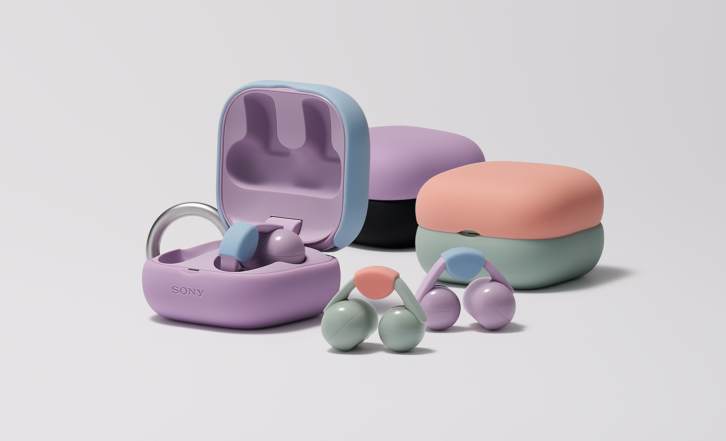
The LinkBuds Clip (LBC) is a different animal, designed for more passive, background listening. Sony describes the C-shaped design as an “open ear listening experience [that] lets users hear their surroundings and music at the same time.” Since the phones are neither in nor on the ear, but rather clipped onto the outside, they are very comfortable, fit a wide variety of ear shapes, and could easily be worn for hours without fatigue.
As the LBC is meant to keep users aware of their surroundings, they don’t feature any active noise cancellation. They can also deliver up to nine hours of listening with the earbuds and up to 37 hours with the charging case, and can provide up to an hour of listening after three minutes of charging. The LBCs are offered in black, greige (a combination of grey and beige), green, and lavender. Sony also offers the ability to personalize the look of the charging case by offering top and bottom protective case covers in coral, green, blue, lavender, and black. The bottom cover also includes a small carabiner to attach to a bag.
Sound Connect App
While you can simply turn any of the phones on and pair them with the Bluetooth in your device — all of which are Bluetooth 5.3 and support LE, and are compatible with Auracast — and start listening, you’ll be missing out on a ton of configuration and adjustments by not installing Sony’s Sound Connect app (Android and iOS).
Now, normally, I’m kind of against having to download a new app to do something, but there are so many features in the Sound Connect app that it really goes hand-in-hand with using the phones and is required to get the most out of them. While taking notes during my review, I wrote down about 1500 words describing different features the app offered, so I’m going to greatly condense that here.
The app is divided into My Device, Scene, Discover, and Menu options to quickly navigate to different functions. When you open the app, you are shown the currently connected phones along with the battery level of both phones and the case, if applicable. You can configure what items appear on the home screen, from Ambient Sound Control, Listening Mode, Equalizer, Connect to 2 devices simultaneously, Speak-to-Chat, and Bluetooth Connection Quality. Touching any of these takes you into their settings to make further adjustments. There is also a tab to drill deeper into the device’s settings.
Additionally, it shows what content is currently playing, along with some basic (skip -/+ and play/pause) transport controls and a volume slider. One thing I really liked was a real-time sound pressure meter that shows how loud the current content is in dB, with a link to a chart showing the sound allowance recommended by the World Health Organization.
If you have enabled the ability to simultaneously connect to two devices, it will show the two devices you’re connected to, and which is currently providing audio, and allow you to easily switch between, say, a phone and a computer. The phones play an audible chime as it creates (or drops) both of the connections, so you know it is connected to both.
There are five EQ presets with the names Heavy, Clear, Hard, Soft, and Game, plus a manual mode and two custom slots. All of them let you adjust 10 bands from 31 Hz to 16 kHz by ±6 dB. There’s also a “Find Your Equalizer” mode that lets you listen to several different settings to personalize what sounds best, and then automatically saves that to Custom 2.
Device settings offer deeper adjustments to many of the choices above, plus more configurations. For example, you can customize what function happens when tapping the WF or LBC’s left or right earbuds, select which noise canceling modes to toggle through, use head gesture (nod or shake) to accept/decline phone calls, whether or not to pause music when phones are removed, and so on.
With the WH and WF you can select whether to use Voice Control or Voice Assistant. With Voice Control enabled, say, “Hey, Headphones” and then ask for a variety of things like play/pause music, skip or replay song, raise/lower volume, check battery level, or set Noise Cancel or Ambient mode. You can also say “Assistant” and activate your device’s voice control features (i.e., Siri). I’m not much into the habit of using voice control for simple commands; it’s almost always faster and simpler to just use the touch sensor to adjust volume or skip tracks than sit there talking to myself to do it, but it’s there if you want it. Voice Assistant allows you to use the headphones to access your device’s voice assist function. Or you can turn voice control off completely.
There’s a Quick Access setting to configure launching Amazon Music, Apple Music, Endel, Spotify, and YouTube Music.
Under Scene, you can configure the phones to automatically begin playing content and/or use adaptive sound control when you are doing a variety of activities like commuting, walking, running, at the gym, etc. You can also store locations you frequent, like your home, work, or a gym, to automatically trigger content. You can enable a voice cue that will tell you the date and day’s weather when you first put the phones on for the day, announce the time on each hour, or read messages/notifications automatically as they come in. This can be configured for what announcements you want to hear, such as Messages, LinkedIn, WhatsApp, or X. I really liked the Voice Cue, especially the auto message reading and hourly notifications, but it is configurable and defeatable if you don’t like it. Note: Enabling always-on location services is required for some of these features to work.
Discovery presents a history of your listening, showing your weekly percentage of safe sound allowance, enabling a safe volume control setting that automatically limits volume levels if you are exceeding weekly safe limits, and shows how much the noise canceling reduced unsafe ambient sound levels for the week. With multiple headphones registered, it gives a report of the average listening level and time of each pair of headphones, broken down by day/week, month, or year. It will also suggest registering newly learned locations, give you a breakdown of listening history, and award badges for unlocking different achievements, like daily and weekly listening, using different settings, viewing tutorials, etc. A tutorial feature shows different functions/settings of the phones and app.
If you’ve linked the headphones to a Sony online account (my.account.sony.com), you can back up and restore your data and settings.
Once you get used to using the app to adjust settings and features and check things, it becomes really valuable. Plus, there are features and configurations you just don’t have access to without the app.
If you want to learn more, both the WH and WF models have a thorough, 140-plus-page online help guide that details all the features.
Fit and Feel
The WF and LBC were the first to arrive, though I had actually been given a press-only demo of them prior to launch at CES. And, honestly, I was really unimpressed with the WF phones at CES. I found both the bass performance and noise canceling to be virtually nonexistent. I was certain Sony couldn’t have missed this badly on the product, so I was eager to give them a closer listen at home.

Turns out, the phones ship with the medium ear-tips installed — what I assume was used at the demo — and those were too small for my ears to create the proper fit. (Four sets of tips are included, ranging from extra-small to large.) With in-ear headphones, finding the right tip for the correct fit is vital. Sony says, “Twist the headset unit to slide the earbud tip deep into your ear canal. If your ears are not sealed properly, noise canceling is insufficient, or bass sounds weak, try larger earbud tips.”
There is a wearing test in the app that will check to make sure you have the WF headphones installed correctly (L and R is discreetly printed on the phones, and there’s a small tactile dot on the left bud), and then another test that will play a brief tone and measure how much sound is escaping to confirm you have them properly seated. It was a night-and-day difference after I had the correct tips and the phones properly positioned inside my ears. Even still, I’d occasionally feel like they slipped out of position a bit and I needed to resecure them. Would I have been better served with an even larger tip size? Maybe.
Having said that, getting these properly set deeply in my ears introduced some ear fatigue, however, and after a couple of hours of wearing, I was ready to pull them out and take a break. Though, to be fair, this is generally true for me with most in-ear phones. Could I wear them for a gym session or plane flight? Yes. Could I wear them for eight hours at work? Probably not.
In contrast, the LBCs are very intuitive and comfortable to install and wear, easily clipping onto the outside of your ears. (For listeners with smaller ears, the LBC includes an air fitting cushion that can help create a tighter fit.) They stayed firmly in place whether I was jogging, moving around at the gym, or even playing pickleball, and seemed unfazed no matter what I was doing. I daresay, because the design greatly eliminates ear fatigue, you could actually forget that you’re wearing them. I could see myself easily wearing these for an entire workday.
Finally, we have the WH over-ear headphones. They arrive tucked into their travel case, and with all of the various hinges and bends “crafted using advanced metal injection for a seamless durable fold” according to Sony. The phones kind of look like a contortionist that has been tucked into a place they have no business fitting, and it took me a couple of minutes to figure out how to reinstall them in the case. Another smart design here is that, if you’re wearing them around your neck, the phones swivel in so the cushioned earpads sit against your collar bones instead of the hard plastic back. Love.
Once removed, the first thing I noticed was how light they are. Many premium headphones are heavier, and end up feeling like they’re rubbing into the top of my head after a bit. At 254 grams (8.96 ounces), the WH’s felt noticeably lighter than other phones I’ve worn, which translated to longer/more comfortable wearing time. Compare this to 312 grams for the Sonos Ace, 340 for the Mark Levinson No5909, and 385 for Apple’s AirPods Max.
The WH‑XM6’s soft‑fit, wider headband uses synthetic leather that really helps reduce top‑of‑head pressure, and the stretchable earpads are both comfortable and great at creating a passive seal from outside noise. I also found I didn’t have nearly as much ear heat/sweat wearing these as I did the Sonos Ace and Levinson No5909s. Bottom line, I found the WH phones supremely comfortable, which translated into being able to listen for as long as I wanted without issue.
Performance
The first step in using the phones is to pair them to your device. If using a smart phone, I’d suggest using the Sound Connect app for this; however, if pairing to something else like a laptop, you would press and hold the power button on the WH models to put them into pairing mode (they start announcing “Pairing…pairing…”), or opening the lid of the charging case (with the phones in them) and then pressing a small button on the back of the case. With all the models, I never had any issues with them after they had been paired. Also nice is that if you have multiple pairs, the Sound Connect app does a nice job juggling between them as you connect/disconnect.
Both the WF and WH models sound terrific, and I think for many people it will simply come down to which style they prefer. The over-ear WH kind of silently declares, “Don’t bother me,” which some people like, while the more subtle in-ear WF can be more socially inviting. In truth, even with ambient mode engaged, having a real conversation with the music playing was difficult at best. When I was in environments that required my ongoing attention, the LBCs were the definite go-to, letting me enjoy music while still holding a conversation and hear what was going on around me.
I loved that both phones offer a Quick Attention mode that heavily mutes the music and turns on the mics for listening to the outside world for a quick interaction. To activate this, you put your hand over the right earcup of the WH, and it instantly engages, and with the WF you press and hold the left earbud. Removing your hand/finger returns the volume and NC settings. I used this feature quite a bit as my family grew exasperated with my inability to hear them while wearing the phones for hours during this review, and it’s great.
For control, the WH uses touch, tap, and swipe functions on the right cup. Tap twice to play/pause music or accept/end a call, swipe forward or backward to skip songs, swipe up or down to adjust volume, tap and hold to activate your voice assistant. These all worked smoothly, intuitively, and consistently. The left cup has the ANC button, which can be configured for different functions based on one, two, or three presses. A quick press on the power button announces the battery status.
As mentioned earlier, both the WF and LBC models allow configuration of the button taps of both the left and right buds within the Sound Connect app. My button tap success was greater with the WFs than the LBCs, as they had a larger tap surface area, but there were lots of times when I’d pause when I meant to skip. or vice versa, or just forget how I’d configured each model.
All the phones offer at least Standard and Background Music listening modes. The LBC adds a Voice Boost and Sound Leakage Reduction options, and the WH adds a Cinema one. Background Music adjusts “the spread of sound” to make it sound like you are in a different listening environment, and gives choices for My Room (which doesn’t actually have any relationship to your actual room), living room, and café. This pushed the sound out into the distance, with café having the biggest effect, but if I wanted music more in the background, I preferred just lowering the volume. If you like music to sound like it’s off in the distance, maybe while studying or reading, the option is there.
Voice Boost is designed to increase the volume of voices, but it seemed to raise the volume of everything by up to 10 dB. When wearing the LBCs in a noisy environment, like the gym, this was a good mode to focus on the music rather than the noise. Sound Leakage Reduction “suppresses high-pitched sounds and reduces sound leakage into the environment,” and would be good if you were wearing the LBCs in a quiet environment with people in close proximity to you. Sitting next to my wife in bed, she said it definitely muted what she was able to hear.
Cinema employs Sony’s 360 Reality Audio Upmix technology to try to create a more immersive experience from any 2-channel source. It also seemed to produce slightly deeper, more cinematic bass and created a nice surround effect, placing objects at different points around your head. It was more “spacious,” with sound feeling like it was bigger than the headphones.
Review: Sonos Ace Wireless Headphones
Another mode that both the WH and WF models share is Speak-to-Chat, which can be turned on/off and has three sensitivities: Automatic, High (when it doesn’t hear you well), and Low (when it hears you too well). In theory, this is a fantastic feature. You start talking, the headphones mute the music and use the mics to enhance voices so you can have a conversation with someone. On Automatic sensitivity, it triggered frequently in noisy places like the gym, or if I breathed a little too hard or hummed under my breath. On Low, it didn’t trigger as easily, but I’d often have to be speaking for a few seconds before it would trigger. Something like, “Hey, what’s up?” often wouldn’t be enough to do it. When it does trigger, you can immediately close it with a quick press of the ANC button. This feature definitely seemed to work better in quiet environments, and I ultimately turned it off and just used the Quick Attention mode.
As you might expect from the number of microphones employed in each model, the WH offered the best call quality, with the WF a close second, and the LBCs a distant third. In a quiet room, the WH and WF were very close, but when there was a lot of background noise, the WH did a better job of muffling that for the person on the other end.
As far as noise-canceling performance goes, again, the WH and WF were close — which is to say fantastic from both — but the WH just did a better job. With both phones, putting them on in a room with normal background volume introduced near-total silence. Things like fan noise, the vacuum, or a running shower were completely gone. I played airplane engine sounds from my Sonos Move speaker at volumes reaching 100 dB, far louder than actual in-cabin noise, and the amount of reduction was amazing. Both pairs reduced this from, “Wow! That’s loud!” to “I hear some noise off in the distance.” Interestingly, the WF buds seemed slightly better at blocking low‑frequency noise, probably because of how they seal in the ear, while the WH did a more complete job across the full spectrum, especially with higher‑frequency sounds. Neither pair seemed to have any issues with changing NC sounds or effectiveness when I would turn my head left and right.
While I really enjoyed the WFs, the WHs were ultimately my go-to. For one, I just found them more comfortable to wear over long periods. Also, I never worried about the fit as they always just stayed in place. And while the WFs were among the best-sounding in-ear models I’ve heard, the larger drivers of the WH delivered superior, deeper, and more authoritative bass. Tracks like Billie Eilish’s “bury a friend” or Kendrick Lamar’s “HUMBLE.” just hit harder. I also found the sound to be more spacious and “out of my head,” especially while watching movies.
With the new WF-1000MX6 and WH-1000MX6, Sony has shown that it wants to remain king of the wireless, noise-canceling headphone market, while the LinkBuds Clip offer a nice alternative to lifestyle headphones that require all-day wear with awareness of your surroundings. And all of them give Sony dealers a slam-dunk sale add-on opportunity.
877-865-7669 – Electronics.Sony.com
Product Specs:
- All models feature Bluetooth 5.3 connectivity
- WF-1000XM6 and WH-1000XM6 feature industry-leading active noise cancellation with eight (WF) and 12 (WH) microphones
- WF-1000MX6 weigh 6.5 grams each; 8 hours battery (NC on), 24 hours with case; 8.4mm drive unit; IPX4 rating; USB-C or Qi wireless case charging
- WH-1000MX6 weigh 254 grams; 30 hours battery (NC on); supports simultaneous charge/listen; 30mm drive unit; USB-C charging; mini-jack headphone connection; includes travel case
- LinkBuds Clip weigh 6.4 grams each; 9 hours battery (NC on), 37 hours with case; 10mm drive unit; IPX4 rating; USB-C charging