Kudos: Terrifically simple setup; bright vibrant images; instant home theater; supports 3D (with optional glasses)
Concerns: No third-party remote; some adjustments can be finicky; Wi-Fi dropouts
Good things come to those who wait.
To put that in context, I reached out to XGIMI’s PR team following CES about four years ago trying to get hold of one of the company’s just-launched portable projectors, the Horizon Pro. What showed up for review was the Aura, an ultra-short-throw laser projector that was anything but portable, but I rolled with the punches and reviewed that unit. (The review is available online.)
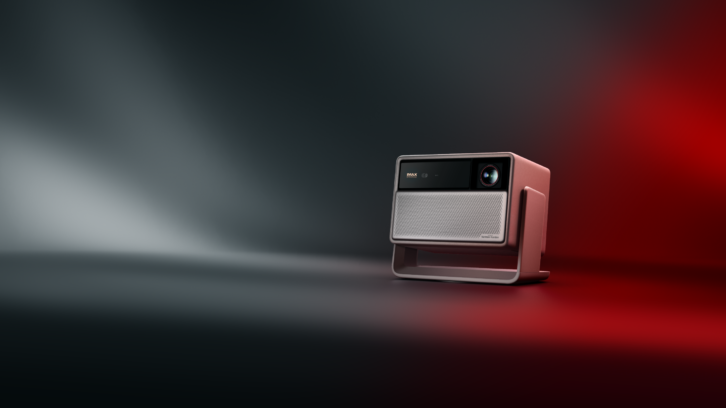
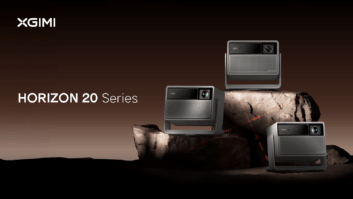
Now the company has refreshed the Horizon lineup by introducing the new Horizon 20 Series, which includes three models: the entry Horizon 20, the step-up Horizon 20 Pro, and the flagship Horizon 20 Max, reviewed here. (#ProTip: When a PR company offers you a review choice between good, better, and best, take the best!)
These projectors share a lot in common, each delivering 4K resolution powered by an RGB Triple Laser light source rated at a 20,000-hour lifespan and utilizing a Texas Instruments 0.47-inch DMD. All incorporate XGIMI’s brand new X-Master Red Ring Lens and also feature optical zoom and lens shift for increased placement flexibility and utilize XGIMI’s latest ISA (Intelligent Screen Alignment) 5.0 technology to simplify installation. All models support Dolby Vision and HDR10+, utilize Google TV OS with full internal streaming capabilities, including Netflix, have Wi-Fi 6 and Bluetooth 5.2 support, and use a Harman/Kardon audio system for built-in entertainment.
The only meaningful performance difference between these models is the rated light output, which comes from using more laser chips. While the entry Horizon 20 uses 20 Laser Chips, the flagship 20 Max uses 40 laser chips, making it capable of reaching 5700 ISO Lumens, XGIMI’s brightest consumer projector to date. (If that number sounds unbelievably high, put a pin in it; we’ll discuss it in a bit.)
The Tech
As mentioned, the Horizon 20 Series projectors all use Texas Instruments’ DLP technology, utilizing a single 0.47-inch DMD (Digital Micromirror Device) chip that contains 2.1 million micromirrors. In order to turn 2.1 million micromirrors (1920 x 1080) into the 8.3 million pixels required for 4K resolution (3840 x 2160), the chip does some incredibly fast switching — 240 times per second — to shift pixels in both the vertical and horizontal directions to produce 4K resolution onscreen. This process all happens so quickly that it is imperceptible to our vision, with our brains merging it into a single image.
If you recall hearing the term “wobulation” back in the day, this is essentially what is happening, but with more pixels for the 4K age. Of course, video purists are loath to call this “true 4K,” as there aren’t actually 8.3 million discrete pixels, as with Sony and JVC projectors, and there are times when you’ll notice that lack of ultra-fine detail and resolution. (Usually on objects with fine, tight rows of vertical lines where there is some camera movement.)
A couple of other terms you’re likely to encounter when looking at laser projectors is “single laser” and “triple laser.” Triple laser, or RGB Triple Laser as XGIMI calls it, uses three different lasers — red, green, and blue — to produce the image onscreen. Because of this three-laser design, one for each of the primary colors, the projector doesn’t require using a spinning color wheel, which helps to eliminate the dreaded RBE (Rainbow Effect) that bothered many single-chip DLP viewers. Also, because of the separate lasers, these projectors can often cover a wider color gamut, and the Horizon 20 Max is rated to cover 110% of the BT.2020 gamut.
For processing, the Horizon 20 Series projectors are powered by MediaTek’s MT9679 SoC (Silicone-on-Chip) and feature 128 GB ROM and 4GB RAM with a Mali-G52 GPU. The MT9679 is described as a “premium 4K120 commercial display and smart projector SoC” that “combines a high‑performance mix of all big-core CPU, dual-core GPU, an advanced 4K video decoder, and a dedicated NPU for AI‑picture and audio quality enhancements.” Chief among these video processing enhancements is AI-PQ (Picture Quality) that can “recognize faces and scenes in real-time, automatically adjusting the image color saturation, contrast, clarity, and performing noise reduction,” and AI-SR (Super Resolution) that “intelligently upscales lower resolution video streams to match the native display resolution.”
XGIMI calls the X-Master Red Ring lens its most advanced self-developed lens to date. This system combines ultra-high-resolution optics with aerospace-grade laser glass for unmatched clarity, superior 99.6% light transmittance, greatly increased brightness, and lasting performance. The aspherical glass also helps suppress spherical aberration, creating a sharper image with tighter focus. This is also the first time an XGIMI home projector has incorporated lens shift, allowing you to move the image in all four directions (V ±120%, H ±45%) without having to touch the projector and without introducing any scaling or distortion. It also features an optical zoom (1.2-1.5:1), which provides better flexibility in positioning.
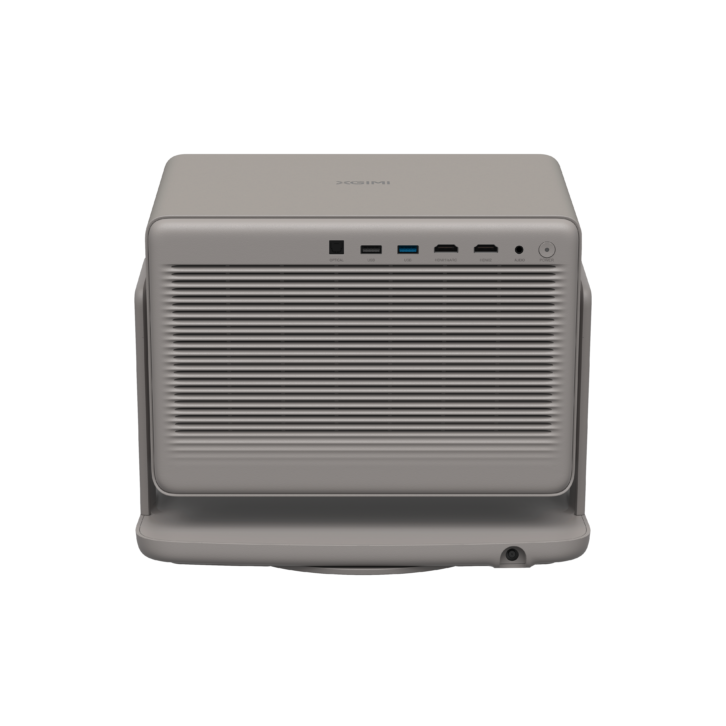
On the audio side, there is a dual Harman/Kardon speaker system powered by a 12-watt stereo amplifier in a 630cc acoustic chamber, with performance rated down to 55 Hz. The projector also has DTS:X Virtualizer for pseudo-surround.
Finally, the projector packs a lot of performance that will likely appeal to gamers. (Note, as a non-gamer, I did not have the ability to test any of these measurements.) XGIMI claims an ultra-responsive 1ms response time at 1080p@240 Hz, 2.2ms at 1080P@120 Hz, 3ms at 4K@60 Hz (Game Mode on, VRR on, AK off). There are also gaming features like Black Equalizer that automatically enhances dark scene details to reveal objects in shadows, Virtual Crosshairs to help stay locked onto targets, and even genre-specific gaming picture modes to maximize gaming such as Assassin’s Creed Mode, FPS Mode, RTS Mode, RPG Mode, and Sports Mode.
First Impressions
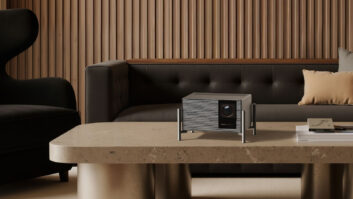
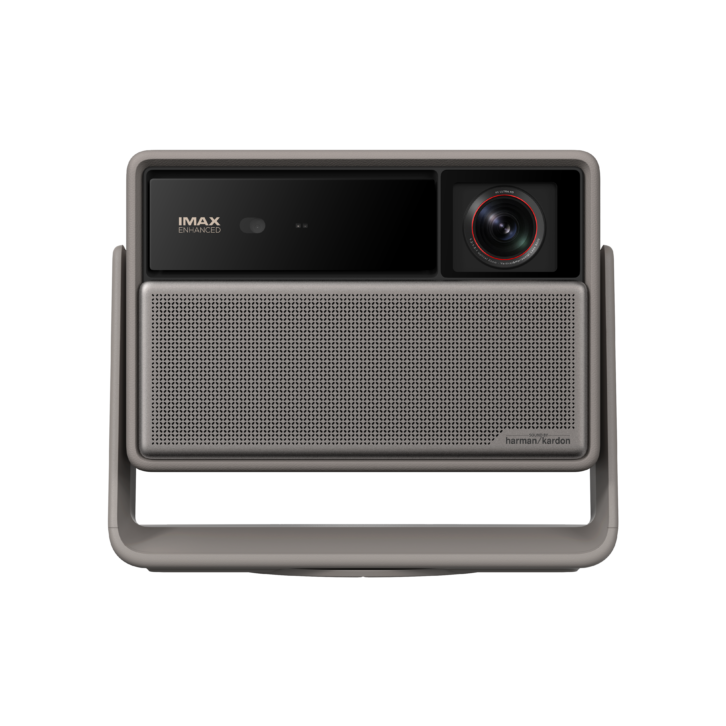
The projector has a nice look to it, finished in what XGIMI describes as a “refined Elephant Grey finish and leather-like texture.” While they don’t call it portable, they also say it “isn’t meant to be hidden,” and it definitely has a more décor-friendly/neutral look compared to the typical black/dark gray colors projectors usually favor, but also having more flair than a white model.
Considering how little content is actually available in the format, it’s interesting they chose to brand the IMAX Enhanced logo prominently on the front of the unit — literally the only printing there. (Well, “Sound by Harman/Kardon” is very discreetly printed in a lower corner.) But, if you got it, flaunt it, I guess. Also, not that it makes much of a functional difference, but the lens is located off-center.
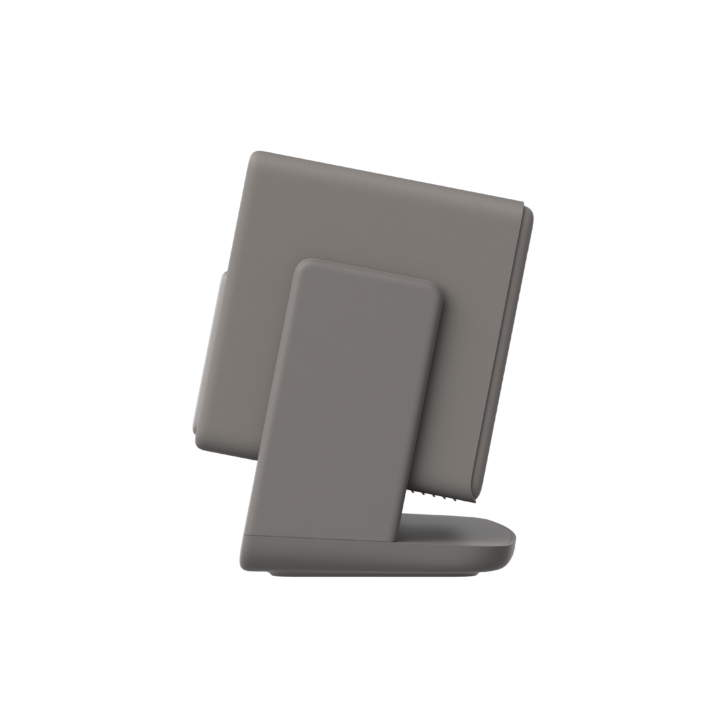
The projector sits in a color-matching stand that makes it simple to position it square-and-level to your wall/screen; however, the projector also swivels in a full circle horizontally in its Lazy Susan-style base and vertically in the stand with enough range of motion for you to literally point it straight up at the ceiling. While lying in bed watching a movie on the ceiling isn’t really that comfortable, I can tell you that it is a big hit with kids. This swivel also makes it easy to get the image at the correct height on the wall if it is sitting on the floor or a low table.
After looking at the projector, my next thought was, “Damn! That’s a big power supply!” I didn’t have a scale, but the chunky, 19-volt, 15.79-amp, 300-watt power brick felt like it weighed more than my laptop. And while XGIMI offers a ceiling mount bracket for the Horizon 20 projectors, I have no idea how you would make that work with the power supply.
The included metal-backed remote feels solid and is Bluetooth-paired to the projector for no-point operation, which is nice. It has instant access buttons to YouTube, Netflix, Amazon Prime, and Google “Free TV.” There is a Google voice control button, but I had a really hard time getting it to work reliably to the point where I just gave up. Five of the buttons are backlit, including input, focus, back, */settings, and Home. There is also a button labeled “Shortcut,” which might be programmable in the future, but for now is used to mute the internal speaker.
Before I got too far into playing with it, I simply plopped it onto an end table, pointed it at an open wall in my house, and fired it up. My real first impression was how viewable the Horizon Max’s image looked just firing onto a large wall space, literally creating an instant experience. I was also stunned by how quiet the projector is. I didn’t think it employed a fan at all, but when I put my ear up to it, I could hear a whisper-quiet noise. The unit is rated at ≤28 dB@1m, so it should never pose an issue.
Setup
I actually didn’t have a lot of open wall space in my home that didn’t have something (a TV, art, a window, a mirror) in the way, so I was a bit limited on where I could use it. By removing a piece of art from the living room, I was able to expose a section of wall that was 120 inches diagonal. So, I watched it there for quite a while, then I repositioned the projector so I could watch it on my 92-inch Draper screen, then I fired it onto a Crestron window shade, then took it on vacation and blasted it on the ceiling of our hotel.
There’s really not much required in the way of setup short of plugging in the power supply. The Horizon Max is a full Google TV, so you’ll need to go through that registration process and connect to your home’s Wi-Fi. I connected an HDMI cable to the output of my Trinnov Altitude 16 so I could watch Kaleidescape content.
The projector utilizes XGIMI’s latest Intelligent Screen Alignment, which includes autofocus, automatic keystone correction, obstacle avoidance, intelligent screen alignment, wall color adaptation, and intelligent eye protection. You can do all these things automatically by going to the Projector option in the settings menu and selecting “Auto Keystone Correction”; the unit will throw up a test pattern and deliver a square and level image in just a few seconds.
To help produce the best image, I would always recommend starting with the projector as close to square-and-level with the wall/screen as possible, but honestly, the projector really doesn’t care and was almost always able to overcome and produce a level 16×9 image however I had it positioned. (The exception would be if I had it extremely angled up onto a wall.) If you don’t like the auto results, you can fine tune them with four points of manual keystone correction, optical image zoom, lens shift, image rotation, or image displacement that digitally repositions the image.
With the 1.2-1.5:1 throw ratio lens, a 100-inch image would have the projector between 8 feet, 9 inches and 10 feet, 11 inches from the screen, while a 150-inch image would place the projector between 13 feet, 1 inch and16 feet, 4 inches away. While XGIMI recommends using a projection size of 60-150 inches for the best experience, you could go all the way up to 300 inches, though you’d need to place the projector 26 feet, 2 inches to 32 feet, 8 inches back.
I was excited to see how the Wall Color Adaption feature worked, which throws up a series of six different color boxes and presumably measures how it thinks they should look versus how they actually look on the wall based by the paint color, helping to “correct the white balance and achieve a more uniform color output,” calibrating “the picture based on wall colors within a color temperature range of 3000K to 15000K.”
In practice, no matter what color surface I projected on — off-white, light gray, light blue, or my 1.3 gain cinema white Draper screen — the adapted color was always oversaturated and pushed the image red/orange, producing unnatural images, so I ended up not using it. Perhaps if your wall were brown or green or something more drastic results would be different.
Eye Protection is a helpful feature that automatically mutes the image if someone/something should walk in front of the lens, but depending on where you locate the projector — and how much traffic is in your room — you might find this annoying, so I disabled it. But, you know, do NOT look into the lens when it is on!
There are a bunch of picture adjustment settings, including 2- and 11-point white balance and a separate Color Tuner with Hue, Saturation, and Brightness adjustments for RGBCYM and Flesh Tone if you want to perform a full color and grayscale calibration. I felt the blacks leaned a bit blue, so a greyscale calibration would likely help.
One thing that is a bit unique about the Horizon 20 Series is that they still support 3D viewing, with active 3D glasses available from XGIMI’s website for $50/pair.
Performance
There is a small power light on the rear of the projector, but it’s off when the projector is off and also off when the projector is on. It just blinks briefly during power-on/off states. Because the projector was so quiet, and the power light is on the rear, I often wasn’t certain if the projector had received the power command, and I’d just sit there for a few moments waiting for the XGIMI logo to come onscreen. From off to on in regular standby mode takes less than 10 seconds, and the turn-off time is near instantaneous.
What I really loved about the Horizon Max was how easy it was to use. Just plop it onto whatever flat surface is roughly square to the screen/wall, angle it to the height you want, hit auto keystone, wait about 3 seconds, and you’ve got a super-viewable and focused image. For people looking for a quick and easy big-screen experience that they can relocate around the home, take on trips, throw onto a sheet or garage door outside for an impromptu outdoor theater, the Horizon checks a ton of boxes. I was able to stand in the kitchen prepping dinner while enjoying a YouTube pickleball match on a 120-inch screen on my wall.
As mentioned, this is a full Google TV, and the projector supported every app I tried to install, including Netflix. However, I had a couple of issues when using the internal apps.
First, there was some pretty bad horizontal and vertical judder on motion, especially when watching anything on Disney+. This was constantly an issue when the camera panned horizontally or when things like credits scrolled vertically. The projector has a motion compensation feature called MEMC (Motion Estimation, Motion Compensation) that is designed to use frame insertion to address this, but I couldn’t find any setting that eliminated the issue. (Movie aficionados will be happy to hear that an update during my review introduced a Real Cinema mode for MEMC that supports true 24P playback!)
Second, in my home, the projector dropped the Wi-Fi connection about every 20 to 30 minutes. Even though it would show it was connected, it would stop streaming. The only way to resolve this was to turn the Wi-Fi off, wait a second, then turn it back on. I had limited experience with it at another location and the issue didn’t seem to exist there, so it is possible that it didn’t like my Luxul mesh network Wi-Fi system. But, for the best performance, I just streamed everything from my Apple TV, which resolved the motion and Wi-Fi issues.
Before I discuss picture quality, let’s talk about that brightness rating of 5700 ISO lumens. Now, while this may be technically accurate, it is really misleading. The only picture mode that can obtain this is High Power, which pushes the image so green/yellow that it is unviewable. Further, engaging High Power mode causes the fan to ramp up from virtually silent to turbo speed, making it sound like a jet engine. Clearly, hitting this brightness is redlining the projector, and it is not recommended for regular viewing, and I can’t think of a single application where it would be usable.
For the majority of my viewing, I watched on my 92-inch projection screen in the Movie picture mode, with the color temperature set to D65 (which is more accurate than the Movie color temp) unless it was content that triggered the Filmmaker or IMAX Enhanced modes.
Fortunately, according to measurements taken by other reviewers, the projector produces over 3000 lumens in its other picture modes, and in my experience, it always delivered a very bright, enjoyable image. Now, will it be able to live in a fully lit environment and compete with a direct-view TV? No. As with any projector, dark colors will always be washed out in that environment and contrast is crushed, and the Horizon’s image looks better the darker your room is.
But even in my living room during the day with all the shades open and the kitchen (background) lights on, it produced a giant, entertaining image. Obviously, you wouldn’t want to watch something really dark like Blade Runner 2049 or Alien during the day, however, if you wanted to watch something bright during the day like a sporting event, or enjoy it in less than a pitch-black room (especially if light is directed away from the screen area), it definitely has the light output to compete.
Laser speckle can be an issue with some laser projectors, but it was rarely an issue here. The only time that it was consistently noticeable was when watching a Dolby Vision presentation of Dream Productions on Disney+, which is the team that creates dreams for Riley from Inside Out. These blob-shaped, mostly mono-color characters are very bright, and there was some noticeable speckle in the highlights. Also, I rarely saw any distracting rainbow artifacts, which can be an issue with single-chip DLP projectors. However, I have to say I’m not overly prone to seeing these, but my family never complained either.
Overall, the Horizon Max’s image is very bright and enjoyable. Watching the demo clips from the Spears & Munsil UHD HDR Benchmark 4K Blu-ray, you can see that the HDR tone-mapping errs on the side of producing the brightest sections of the image versus the darkest. In material mastered at 2000 nits, it blows out the highlights in the brightest sections of the snowy mountains, and doesn’t have the detail or texture in the mountains or grassy fields. It was able to tonemap the visible sun from Alpha, which is mastered at 4000 nits, but it does it at the expense of raising the overall picture brightness and black levels. Scenes that have a lot of overall brightness, like Kiri lighting the way underwater in Avatar 2, always looked really good, and Pandora’s bioluminescence at night glows off the screen.
This raised noise floor was really evident in things like the helicopter insertion scene from Zero Dark Thirty. Here, the helos should be just visible, but images looked like the brightness was raised a few clicks too high and made it look like Mostly Dark Thirty. These raised black levels can make scenes that are really dark look a bit flat and washed out without a lot of depth.
I was hopeful that the DBLE (Dynamic Black Level Expander) would improve the native contrast of roughly 1500:1 up to dynamic contrast closer to 20,000:1, however, engaging DBLE introduced a massive red/pink color shift that made it unwatchable. My wife described it as looking like a photo from the 1970s.
Interestingly, while the effects of most of the other adjustments were visible in the display menu while you were engaging them, DBLE had no effect on the image until exiting the menu.
If the blacks could be improved with DBLE without any impact on the color space — and perhaps allow the unit to have a full-fade-to-black on dark scenes — that would greatly elevate the performance, but with the extreme color shift it introduces, the DBLE feature is really unusable in its current implementation.
As mentioned earlier, there are two other picture “enhancements” worth discussing: AISR and AIPQ. AISR is an AI-powered upscaling engine designed to enhance fine details like strands of hair, small text, etc. It is a kind of sharpening and contrast/brightness boost. I could really see its effects on a pickleball net or in fine text where it really sharpened and clarified the edges. For the most part, I thought it added an extra bit of sharpness to images without too many negative effects. Though, like any enhancement, max could be a bit too much, introducing too much over sharpening “enhancement” and artifacts.
Toggling through the AISR adjustments while looking at the Kaleidescape’s cover art screen, you could really see how it impacted images in different ways. For example, it brightens up some of the rock detail on The Alpinist cover, showing a bit more texture and also better defining the electric bolts and white lines on Spidey’s suit on The Amazing Spider-Man 2, but it adds some ringing and detail loss to the fine line pattern behind Jimmy Stewart on Vertigo and over brightened and washed out the gold armor won by Jason Mamoa on Aquaman.
When working correctly, the AIPQ setting smartly enhanced the bright and dark sections of the image, bringing more depth and highlights that also produced more overall depth and detail and a bit of added color saturation. Things like nighttime cityscape scenes really benefitted, where toggling the setting off made the scene look a bit flat.
But, as with any enhancement, AIPQ can occasionally “mess up,” usually in the form of over-saturating scenes with a lot of primary colors. Near the end of Toy Story 3 at Bonnie’s house, for example, there is a moment with a lot of grass and trees, and these can take on a really unnatural and vibrant shade of emerald green. If it just stayed this color, that would be one thing, but it would occasionally waffle between a more accurate green and the emerald version, which was far more noticeably distracting. A similar thing happened in a scene in Apple TV’s Down Cemetery Road, where characters were walking outside in an English forest. During another nighttime scene, as characters were on top of a building in Oxford, it enhanced the lighting in the windows, but in doing so it also raised the black levels enough to introduce some banding that wasn’t apparent with AIPQ turned off. Something that repeatedly tripped up the AIPQ algorithm was watching pickleball on YouTube, where the green and blue of the court surface would almost strobe as it shifted back and forth between its normal “correct” colors and the enhanced super-oversaturated versions.
Clearly, there’s no free lunch — you get improvements in one area but sometimes at the expense of performance in another. But when AIPQ got out of the way and just did its thing, the effects were nearly always better and worth putting up with the occasional over-saturated color hiccup. When you see the added brightness and pop of AIPQ, it’s difficult to not want to keep it engaged, damn the artifacts!
With everything dialed in and working, as with the IMAX Enhanced version of The Fantastic 4: First Steps on Disney+, when the team visits Galactus and Johnny is flying through the searing red/orange fire and Galactus’s gleaming blue eyes are staring, images had tons of pop, impact, and detail, and looked, well, fantastic. The projector also delivered all the fine detail in the costume design of the Avengers crew in Civil War, from the stitching in Cap’s uniform to the scratches and dings in Tony’s Iron Man suit. It also easily presented the evolution and advancements of the animation quality from Toy Story 1 through 4, letting you appreciate the far greater detail and design as the series progressed.
The internal speaker is more than adequate for portable viewing, able to produce enough volume to entertain a room full of people with bass that plays deep enough to call it “full” sounding. If you wanted to take this outside and blast an image on the garage for an impromptu movie night, have the kids take it into their room for a slumber party, or take it on vacation to a hotel or Airbnb, the speaker is certainly up to the task.
However, like any video display device, the experience is always greatly enhanced by adding a separate audio system. Fortunately, you could do that either via Bluetooth, mini-jack, optical audio, or HDMI eARC to a soundbar/audio system. I ran the video output from my Trinnov to it so I could use my main surround system, which elevated the theatrical experience considerably.
Interestingly, XGIMI doesn’t list the Horizon 20 Series projectors on its website under the portable models, rather it places them under “Home Projectors,” implying they are more for dedicated room use. In fact, I’m not sure the word “portable” is even mentioned in any of the marketing literature I saw describing this Horizon 20 Series. However, I think portability is one of the projector’s real strengths, and what makes it worth considering as more of a lifestyle model.
Sure, it can live in a dedicated, light-controlled theater room and deliver an incredibly engaging image and experience, but it can also easily venture outside for a movie night, slip into a bedroom, pop into the living room, or even join you on a vacation. The competition for solid projector performance at sub $3000 pricing has become fierce, and models have improved so much and offer so many features and performance, being able to use the Horizon 20 Max in more than one space definitely makes it a giant value add.
833-325-1055; us.xgimi.com
Product Specs:
- 3 RGB Laser Projector rated at 5700 ISO lumens with 20,000-hour lifespan
- DLP technology with 0.47-inch DMD with 3840 x 2160 resolution
- Supports 4K with Dolby Vision, HDR10+, HDR10, IMAX Enhanced, and HLG
- 2-1.5:1 throw ratio with auto-focus supports image sizes from 40–300 inches diagonal; Optical and Digital Zoom; Lens Shift V ±120%/H ±45%
- Intelligent Screen Alignment (ISA) 5.0 with obstacle avoidance
- Two-speaker Harman Kardon audio system with 2×12-watt power
- Google TV and Chromecast built-in, with Google Home control
- Inputs: 2 HDMI 2.1 inputs (1 eARC), 2 USB (one 3.0); Outputs: Toslink optical audio, mini-jack audio, detachable power; Wi-Fi 6 Dual-band 2.4/5 GHz, Bluetooth 5.2
- Dimensions: 9.8 x 11.7 x 7.5 inches (HxWxD)
- Weight: 11.9 pounds