Step into an audio/video showroom today, and it’s hard not to be impressed. Modern displays, including high-end flat panels, projectors, and video walls, often look better than ever straight out of the box. Many ship with factory calibration modes that are reasonably accurate, sometimes even excellent by historical standards. But for professional integrators working at the top of the market, “good good” isn’t the finish line. It’s now the starting point.
Despite the improvements display manufacturers have made, there’s usually substantial untapped performance left on the table. And in an industry where competition is fierce and clients expect excellence, squeezing out that extra performance isn’t just about bragging rights, it’s about delivering measurable value and differentiation.
Factory calibration and default settings are inherently a one-size-fits-all compromise. Manufacturers can’t predict the characteristics of every room, signal chain, or use case, so they ship displays with broadly acceptable settings. For some clients, this indeed may be good enough. But many professional integrators want to maximize their clients’ return on investment, and that means digging deeper.
Even when a display is well-calibrated out of the box, real-world conditions can still have a noticeable impact. Room environments, in particular, can influence perceived contrast, brightness, and color accuracy. For projectors, the choice of screen material introduces yet another variable, often altering white balance and color in ways that create a challenge for the integrator to account for.

Proper setup and calibration of video sources, AVR settings, and any video switching or distribution systems are also essential. These elements are often overlooked, with many devices left in default or non-optimal modes that compromise image quality. Such misconfigurations can cause degraded picture quality, even if the display itself is reasonably well set up.
In other cases, factory default settings may not be optimal. Performance can also vary unit to unit, and some manufacturers prioritize showroom punch over reference accuracy. It’s usually easy enough to switch to a better picture mode and achieve an improvement, but the real opportunity lies in going further, serving the client by fine-tuning the entire system to unlock its full potential.
Related: madVR Labs Launches Professional Services Group for Elite Private Cinemas
Today’s displays are larger, brighter, and sharper than ever before. That’s great for immersion, but it also makes flaws more visible. For example, motion judder that was more subtle and tolerable on a 55-inch display can be distracting or even jarring on a large video wall or projection screen. And immersion can take a big hit due to black bars from different aspect ratio content. The situation is further complicated due to subtitles not properly fitting on wider aspect ratio screens, such as 2.35:1.
These are precisely the kinds of challenges that professional calibration and today’s video processing excel at addressing.
Unlocking Performance Through Calibration and Processing
Most commonly, calibrators create precise 1D and 3D LUTs (Look-Up Tables) that optimize grayscale, gamma, and gamut tracking for the specific display in its actual viewing environment. This ensures accurate image reproduction that reflects both the unique characteristics of the display and the room. While some displays support internal calibration controls, video processors such as the madVR Envy offer even greater flexibility and precision for achieving exceptionally accurate results.
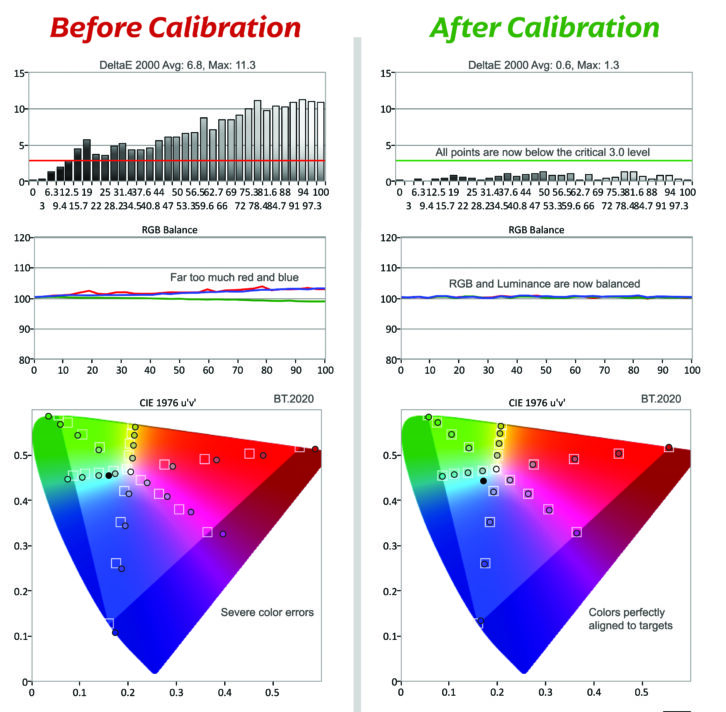
Advanced calibrators often take things even further. They know display-specific configuration tricks that can significantly improve native contrast, brightness, gamut coverage, and overall performance. For example, they may manipulate certain internal controls or service menu settings that boost performance but invalidate the factory calibration in the process. Calibrators typically apply these types of performance-enhancing techniques, then use calibration with a video processor to correct the resulting deviations from the factory settings to maximize performance.
Furthermore, professional calibration isn’t just about tuning the display; it’s about optimizing the entire signal chain end to end. From sources and AVRs to processors and the display itself, every step in the signal path matters. Knowing how to configure and optimize all devices in the chain is crucial to unlocking the system’s full potential.
This is where video processors have become indispensable in high-end systems. For instance, the madVR Envy supports 1D LUTs with up to 4096 points of grayscale and gamma correction, and 3D LUTs with up to 16.7 million interpolated points of gamut correction — levels of precision not available with internal display controls or other devices. This enables professional calibrators to push performance to true reference levels, with extremely fine-grained control to apply targeted adjustments wherever needed.
Beyond Calibration: Real-World Processing Benefits
While calibration ensures the image is accurate, video processing can make it extraordinary. The madVR Envy’s patented HDR dynamic tone mapping dynamically analyzes every frame, preserving highlight detail and delivering optimal brightness scene by scene. Its intelligent aspect ratio management can reduce or eliminate black bars and use non-linear stretch to fill more of the screen without cropping, creating a more immersive experience for both 16:9 and 2.35 viewing.
Not to be overlooked is motion processing. As screens grow and brightness climbs, motion blur and judder become more distracting. Envy Extreme’s MotionAI eliminates these artifacts without introducing the dreaded “soap opera effect,” preserving the cinematic feel while delivering a clear, stable image even in challenging content. Even elements like how subtitles are displayed and fit the screen are greatly improved, making subtitles seamlessly integrated rather than a distraction using the Envy’s Dynamic Subtitle Overlay.
Unlocking Reference Performance Through Calibration
Display manufacturers have done an impressive job improving out-of-the-box accuracy. But “good enough” is far from “optimized for this client, in this room, with this display and these sources.” Professional calibration, combined with modern video processing, unlocks the full potential of today’s displays and creates experiences that truly stand out.
New Tech Week: Best of Show Awards at CEDIA Expo 2025 Winners
For integrators, the benefits extend far beyond picture quality. A system that’s been expertly optimized performs consistently day after day, regardless of content. That means fewer service calls, happier clients, stronger referrals, and a real competitive edge in a crowded marketplace — maximizing both client ROI and business impact.
Clients may not know the terminology for grayscale tracking or tone mapping, but they know a spectacular image when they see one — and they remember who delivered that experience. In the pursuit of true reference performance, calibration and video processing are no longer extras; they’re essential.