How Top-Tier Projectors Stack Up Against Entry-Level Models

Anthony Grimani ([email protected]) is president of Performance Media Industries, with offices in Novato and San Anselmo, CA.
The first time I saw a digital projector that I thought might give multi-stacked Sony or Runco 9-inch CRTs a run for their money was the Sharp 9000 back around 1999. It was a great little unit for its time. For about $10,000, you got a digital projector that offered many of the benefits of complex rigs costing six to 10 times more. Upon closer inspection of the 9000, with test patterns and such, it fell a bit short of the huge–and hugely expensive–CRT rigs, but the point was made. The digital solution was cheaper and easier, and not a whole lot of people were willing to sacrifice those things for the incremental improvement in performance. Digital projectors are now the de-facto standard, and CRTs? All but gone.
We’re seeing a similar type of thing start to happen again. You can now get a 3,000-lumen, 1920×1080 DLP, LCD, or LCoS projector for about $3,000. That’s enough light output and resolution to drive a pretty big screen in a home theater for less than the cost of a top-tier 60-inch TV. You know what happens when that kind of performance is available for that price? Your customers get wide-eyed when you suggest a projector costing $20,000, and you never see them again. Does this mean that highend projection is going away? Or are there still differences significant enough to sell to properly educated and discriminating clients?
I recently discussed this topic with some of my colleagues in the video world: Joe Kane, Joel Silver, and Dave Abrams. They always have interesting and insightful things to say, and they were kind enough to let me share some of them with you. The simple (and fortunate) answer is yes, there is still quite a bit of difference between entry-level and top-tier video projectors, although, as Joe Kane pointed out, nothing’s perfect even at the very top end. Keep this important fact in mind: while you can get the kind of performance for $3,000 that used to cost $20,000, you can also get performance for $20,000 that used to cost $80,000. We’re talking about a shift of the curve, not just a movement along the lower end of the curve.
Examine the Optical Pathway
Good lens glass isn’t cheap, plain and simple, and bad glass can ruin even the best chipsets. It reduces contrast and resolution. A bad lens won’t hold focus as you move toward the edges of the screen–making the picture look soft overall–and chromatic aberration can be blatant. A low-cost lens also will reduce the full resolution of 1080×1920 pixel systems, and internal reflections will smear light along the lens, resulting in reduced contrast.
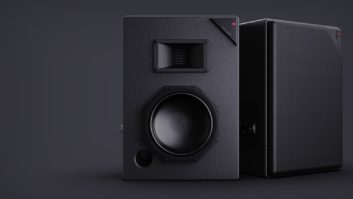
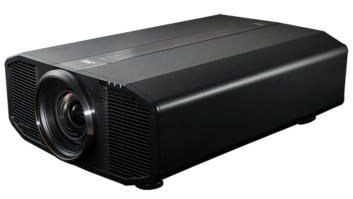
Video experts contend there is still quite a bit of difference between entry-level projectors and top-tier options like those manufactured by SIM2 and a handful of others. Pictured here is a member of SIM2’s $19,990 (MSRP) NERO Series of 120 Hz 3D projectors.
Glass hasn’t come down in price for several decades, and likely won’t any time in the near future. So, to paraphrase a favorite quote from Joel Silver, if you want good glass, bring money. However, glass is not the only thing in the optical pathway. Anything in the light path, from the lamp on, can and usually does affect performance.
Consider the Controls
The better projectors on the market feature controls inside the projector’s menu, etc., that allow you to set up, calibrate, and tweak the picture to be beautiful, accurate, and measure up to industry standards for excellence. This is an area that’s particularly important to Dave Abrams in his calibration work. For example, a good projector needs a comprehensive color management system that allows a calibrator to achieve accurate colorimetry across the entire luminance range. A 10-point grayscale adjustment is important, too. Many of the low-cost projectors just don’t have the calibration control flexibility to yield fine results.
Color Processing.
Did you know that even our highest quality delivery formats, like Bluray Disc, remove up to 75 percent of the color information through 4:2:0 color compression? They get away with it because our eyes are less sensitive to color than luminance detail; however, it doesn’t change the fact that we’re starting with far less color data. That’s where high-quality video processing comes into play.
I’d also like to talk a little bit about light output. I hope you all understand that lumens specs from one projector aren’t comparable to lumens specs from another projector, and most projectors produce substantially less light when properly calibrated than they do when configured for highest light output. When you see those $3,000, 3,000-lumen projectors, many times you’re dealing with optical pathways and processing that have been optimized for output rather than contrast or color accuracy. So, yes, you may end up with enough foot-lamberts off the screen, but the picture quality is going to be washed out and de-saturated, usually tending toward very blue, with washedout skin tones.
While we are seeing some great developments in LED and laser light engines, the big-boy projectors still employ hefty conventional lamps. Dave and Joel both stressed that you need this extra firepower to achieve an accurate picture on home theater screens. Joel likens it to a big engine in a little car. It’s how you achieve high performance.
Message to Clients
The next time you’re talking to clients about projectors, what do you tell them? Why should they buy your $20,000 projector instead of the other $3,000? Start by reminding them that, just as with any industry, there is an objective benchmark for video performance. The recently codified CEDIA CEB23 standard is a great resource to use–have it with you to show your clients. Then explain to them what is necessary to meet those standards. Talk about the optical pathway, especially the lens. Use the example of cameras. People know that good lenses can cost as much as the camera. The same is true for projectors. Also talk about calibration and the need for comprehensive picture controls. Controls with the kind of range and precision required to make the necessary adjustments are expensive to develop and implement in circuitry.
Good video processing for color, etc., has never been cheap. It’s just like with lenses; if you want good video processing, bring money. And, of course, the big lamps required to drive big screens to bright levels require extra space and cooling that you’re just not going to find for $3,000.
Hopefully, with these tools, you’ll be able to convince them to make the right choice. Always remember that we’re in the entertainment business, and people aren’t going to be entertained by a bad picture. Yes, nice projectors make you more money, but they also make a better picture, which is the right thing to do for your clients regardless of the financial side!
Chase Walton contributed to this column.