Kudos: Incredible, reference-level picture quality; outstanding black levels, brightness, and color reproduction
Concerns: App frequently doesn’t connect to TV; no backlit remote; Theater Quad requires a subwoofer

There have been several moments when I have experienced a generational improvement in display picture quality, where I thought, “That’s it. It just can’t get any better.”
The first time was when I experienced HDTV for the first time. (Anyone else remember the “Texas Wild” video loop that played on nearly every display at CEDIA in the late ’90s?) Another was when I saw a closed-room demo of a prototype Pioneer Elite Plasma that had black levels so black that it produced an audible gasp from the room of media in attendance. Another was a 10,000-nit, 85-inch 8K HDR prototype Sony bowed in 2018.
Then there is this new Sony BRAVIA 8 II, Sony’s latest-generation QD-OLED panel that was recently awarded the 2025 “King of TV” title from the annual Value Electronics shootout. The QD stands for “Quantum Dots,” which uses a blue OLED light source that passes through a layer of quantum dots, delivering a wider color gamut and increased brightness. This M2 panel comes with several significant upgrades over the previous flagship A95L, as well as a significant performance upgrade over the “traditional” BRAVIA 8 OLED, which remains current in the lineup.
Seeing the picture quality of this display at a Sony media event in New York, where it was being demonstrated next to Sony’s BVM-HX3110 $30,000 Mini-LED professional studio grading monitor, it is difficult to imagine how it could be improved, but I was anxious to see how it performed in my home.
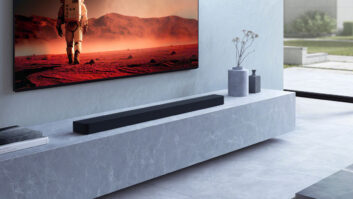
To complete the review, Sony also sent its BRAVIA Theater Quad (technically, HT-A9M2) speaker system, a wireless, four-speaker, 4.0.4 configuration that offers a unique alternative to a soundbar audio system.
First Impressions
Sony is continuing its “Cinema Is Coming Home” messaging for a second year, highlighting the lens-to-living room experience: Films are shot with Sony cameras, mixed at Sony Pictures Studios, mastered using Sony professional equipment, and then experienced at home on a Sony system. By staying in the Sony ecosystem, the final experience most closely matches the creator’s intent. In line with that, Sony claims that research has revealed that movie watching remains the primary reason for upgrading to a larger screen.
Sony updates the look of its panels regularly, and this BRAVIA 8 II features the company’s premium “One Slate” design, which has the thinnest of black bezels along the sides and top with a slightly thicker trim at the bottom that looks minimalist and sleek, and an overall slimmer chassis than the XR80. The TV features a dual-height stand that can either be dropped nearly to tabletop level (technically 0.5 inches above) or raised 3 inches to allow the bottom of the screen to clear a soundbar. If wall-mounting, the TV utilizes a 300 x 300 VESA pattern.
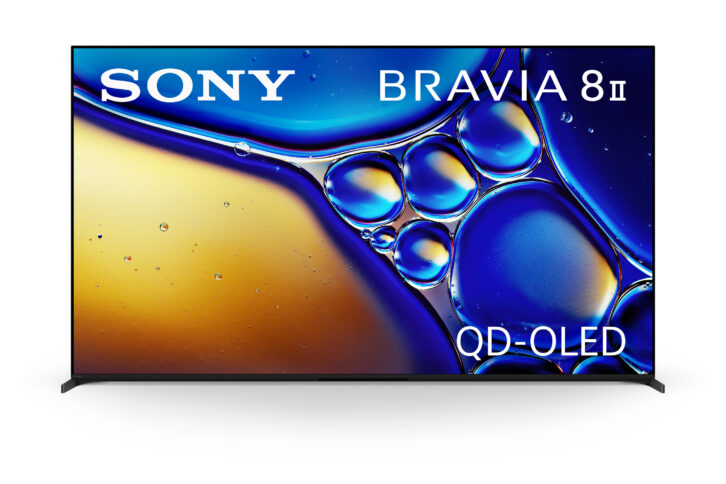
It’s a small thing, but I really appreciated that this display ships with a full-screen plastic protector that peels off after install (which also makes for a satisfying bit of ASMR if you’re into that). Functionally, this allows you to pull it out of the box and install it on the stand (or wall mount) without getting fingerprints all over the screen.
Another small thing that I didn’t like? Sony still uses regular wall electrical plugs, instead of going to an angled, close-fit plug. I’d have to imagine that a majority of the people purchasing a $3000-plus TV are going to wall-mount it, so why not include a power plug that facilitates this?
Sony introduced a new remote control for its 2025 display models, which are made from Ecoplastic using over 75% recycled plastic. The remote features six app shortcut buttons — Sony Pictures Core, Netflix, Disney+, Prime Video, Crunchyroll, and YouTube — that will power on the display and launch the app. Unfortunately, even though this is Sony’s most premium-priced 65-inch display, the BRAVIA 8 II doesn’t feature Sony’s premium remote control, which means the one included isn’t backlit or feature rechargeable batteries. That’s another real bummer at this price point. (According to Sony, “While the BRAVIA 8 II is the flagship OLED, the development team sees the BRAVIA 9 as the true flagship of the entire TV line as its HDR impact is closest to the BVM-HX3110, which is why it has the premium backlit remote.” You also don’t get the BRAVIA Cam, which is an optional accessory that comes standard with the BRAVIA 9.)
It’s worth noting that the BRAVIA 8 II Series only features two sizes, 55- and 65-inch, and Sony has no current plans to expand the size range. If you need a larger size, Sony will continue to offer the XR77A95L, introduced in 2024. This display is the basis for Sony’s professional client monitor (FWD-A95L) used in post-production, visual effects, and on-set monitoring around the world.
The Theater Quad speaker system comes in a box that looks like it could hold a 40-inch TV and was surprisingly heavy. Besides the four speakers, there is also the main control box and shelf- and wall-mount hardware.
The four speakers are all visually identical, measuring 11 1/2 x 10 7/8 x 2 1/4 inches (H x W x D) and weighing just under six pounds. They are covered in a neutral grey fabric that is definitely more décor-friendly than the standard black. Because all of the speakers look the same, there are labels on the bottom identifying where they need to be placed, i.e., “Front L” or “Rear R.”
Meet the New “King”
Video processing has always been the not-so-secret sauce behind Sony’s terrific picture quality, and this display continues to use the XR Processor, but it’s been refined to take advantage of the BRAVIA 8 II’s capabilities.
The XR Processor is tasked with improving picture quality and has been steadily improved since it was introduced in 2021. Displays featuring this tech have also won the “King of TV” shootout every year since it was launched, so clearly there is a correlation.
The XR Pprocessor uses AI when analyzing images, processing and enhancing content similarly to how our brain and eyes see the real world. As displays become increasingly larger, this kind of processing becomes more important, as we are focusing on parts of the screen rather than the entire screen. The processor uses Scene Recognition to split an image into hundreds of thousands of on-screen elements, identifying objects as humans would see them, then prioritizing processing to those focal point items. These prioritized items are cross-analyzed for color, contrast, brightness, and motion against a massive database of images, using Depth Mapping to further enhance images by applying processing to produce the sharpest, brightest, clearest images possible. All accomplished for all 8-million-plus pixels in every video frame.
For 2025, Sony has added AI Super Resolution to its XR clear image processing for finer detail and noise reduction.
As mentioned, the BRAVIA 8 II uses the latest-generation QD-OLED panel, which is responsible for an increase in brightness. By the numbers, this panel is 50% brighter than the BRAVIA 8 OLED and 25% brighter than last year’s A95L QD-OLED panel. Due to this extra brightness, the BRAVIA 8 II achieves higher/larger color volume than the A95L, which is especially evident in HDR content and the BT.2020 color space. The BRAVIA 8 II is also more efficient, able to achieve higher peak brightness, along with better low-luminance and near-black performance, thanks to the combination of the new panel and XR processing working together, improving contrast.
Ultimately, the BRAVIA 8 II’s key improvements include higher peak brightness, higher color volume, and better low-luminance performance, all of which bring the picture quality closer to Sony’s BVM reference monitors, which are the standard for post-production worldwide.
Also, something worth mentioning is that every Sony panel — not just this BRAVIA 8 II, but every panel — is Mura corrected at the factory using a Sony sensor to analyze the panel and correct for Mura, color casts, etc. I wasn’t exactly sure what Mura was, so I looked it up. Mura refers to the inconsistency of brightness or chroma between adjacent pixels that can lead to visual artifacts such as spots, blotches, or lines, causing pixel nonuniformity. By Mura correcting the panel, you get a more uniform appearance, free from graininess or other defects that can detract from the image.
TV Setup
Like every Sony TV in recent memory, the BRAVIA 8 II is a Google TV running the Android 12 OS, meaning it needs to be “activated” and registered before it can do much of anything. This latest OS allows for individual and kids’ profiles, which allows individualization of layouts and provides specific recommendations based on what is watched. This was a cool feature, letting me keep my watch and recommendation list separate from my 19-year-old daughter’s. It also had 32 GB of on-board storage.
This TV features an Ambient Screensaver (art) mode that can utilize Google’s Gemini AI to create AI screen savers, and there is also a Google Home Control tab for smart home control directly from the TV’s side panel.
Both the TV and remote feature built-in microphones for voice control; however, the TV has a physical microphone on/off switch if you aren’t comfortable with it potentially listening.
The panel also includes Sony’s new Eco Dashboard 2, which lets you quickly access and change eco-related settings (power saving, ambient light sensor, panel shut off times, etc.), as well as check the display’s real-time and historic power consumption.
There are seven available picture modes. It retains the Vivid (“Torch”) mode, which “maximizes device and panel performance for Shopfront display” but which is so over-the-top with the BRAVIA 8 II’s brightness and color volume that it is virtually unwatchable for most content. Most customers will probably prefer the Standard mode when watching things like broadcast TV or YouTube. The Professional mode most accurately reproduces the look of the BVM-HX3110 reference monitor, but I found it did this at the expense of brightness and pop; however, on really pristine content like Kaleidescape or UHD Blu-rays, this was my preferred go-to for critical viewing. The Cinema mode maintains the creator’s intent by utilizing an ambient light sensor to adjust color tones and adapt to room lighting, which was my preferred setting for non-Dolby Vision encoded streaming movie content. There is also a Calm setting that “reduces blue light output with softer colors and gentle contrast,” as well as Photo to enhance “the brightness, color depth, and sharpness of photos.” There is an IMAX Enhanced setting for any certified IMAX content.
I’m not really a gamer, but this set has some exclusive features designed to get the most out of setting up and playing on a PlayStation 5. Auto HDR Tone Mapping instantly optimizes HDR settings during the PS5’s initial setup, and Auto Genre Picture Mode automatically switches the TV into Game Mode when gaming to ensure reduced input lag, and back to Standard Mode when streaming for optimized picture quality.
With a connected gaming device, a shortcut Game Menu bar lets users quickly adjust gaming picture settings and exclusive assist features in a convenient interface. This includes features like Black Equalizer to reveal details in even the darkest shadows, motion blur reduction, applying a Crosshair overlay, and a Screen Size feature to shrink your screen for precision gaming.
The BRAVIA 8 II’s HDMI 3 and 4 inputs support HDMI 2.1 gaming features like 4K/120, VRR, ALLM, and SBTM (Source-based Tone Mapping), allowing the TV to communicate its HDR capabilities to the gaming device to optimize gaming picture quality.
Other connections include two USB ports, including one with 900mA output; a mini-jack connection that either serves as an optical audio output (adapter included) or an S-Center Speaker Input for use with a compatible Sony soundbar/audio system; an RJ45 LAN connection; mini-jack connections for both RS-232 and IR control; and an RF cable/antenna connection. The TV is Wi-Fi 6E compatible, and can connect to either 2.4, 5, or 6 GHz networks.
Control4 installers will be familiar with Sony’s C4 integration, which requires enabling a setting in the TV’s network options that will have the TV announce itself with SDDP for easy integration.
Audio Setup
Installing the Theater Quad speaker system is pretty straightforward; just place the four speaker modules in the most ideal locations and connect the Control Box to the TV’s eARC output. If you have a compatible Sony display — and I did! — you can also connect the included mini-jack cable to the S-Center connection between the box and display, which allows you to use the display’s speaker to increase the center-channel image.
The Control Box has an HDMI input that supports video formats 4K/120 and 8K HDR, Dolby Vision, and HDMI 2.1 gaming features such as VRR and ALLM. It also supports wireless music streaming via Spotify Connect, AirPlay 2, and Bluetooth 5.2, and decodes Dolby Atmos and DTS:X.
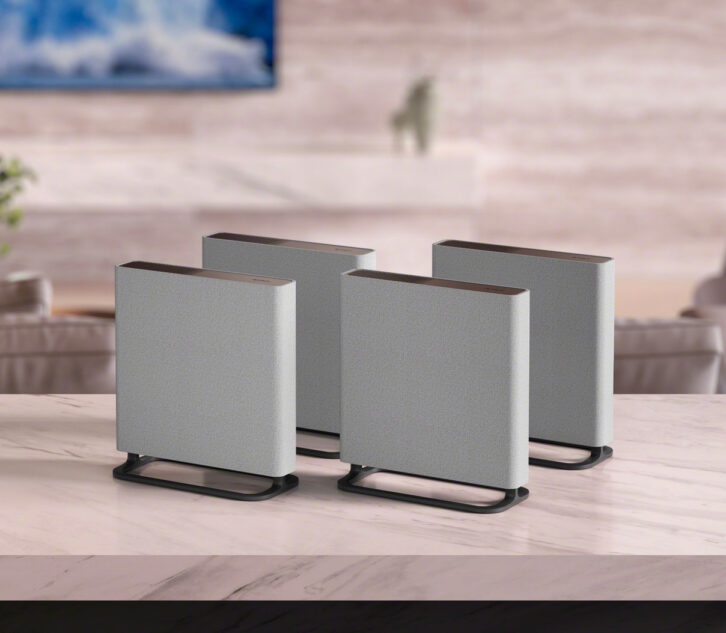
Other than the style change of the speakers, the Quad benefits from an improved wireless protocol to communicate with the speakers, along with upgraded antennas/receivers with auto frequency hopping. The radio output power has also been enhanced by up to 2.5 times compared to the previous model. All of which is to ensure more stable communication between the control box and wireless speakers, and I never experienced any issues with dropouts.
There are four speakers per unit: a 2 3/8-inch full-range driver, a 3 3/8- x 3 3/8-inch X-Balanced woofer, a 3/4-inch tweeter, and a 1 7/16- x 3 1/8-inch X-Balanced upfiring driver. All drivers are individually powered by 31.5 watts, making the total rated system power 504 watts.
Sony describes this as a 4.0.4 system and claims that its 360 Spatial Sound Mapping technology can create up to 12 phantom speakers around the room. The company offers two wireless subwoofers — the SA-SW3 and SA-SW5 — that can be added to the system.
I placed the front speakers on stands to the left and right of the BRAVIA 8 II and wall-mounted the rear speakers with the included brackets. The speaker’s neutral grey finish looks clean on a wall, and the mount holds the speakers nice and tight to the wall. Of course, the trick with wall mounting any powered speaker is how to deal with the power cord, so you’ll need to come up with a solution for that.
Once the speakers are powered on, you need to download the BRAVIA Connect app and create an account (or log in) to complete setup. The Control Box has no OSD, and its LED display provides very limited feedback, so the app is required for accessing all of the audio system’s settings and info.
The app walks you through a variety of settings, including how to run measurements using the microphone built into your device to optimize the sound in your room. When running the setup test tones, I did notice some tonal differences in the mid and low frequencies between the front and rear speakers after they were wall-mounted, but this wasn’t noticeable when listening to real-world content.
After running the measurements, you don’t really get many adjustment options. You can’t toggle the calibrated setting on/off, or tweak the volume of the height channels. You can adjust the rear level in +/- 10 steps, change bass level from min/mid/max, and adjust the height of the sound field from lower/default/higher.
One of the real benefits of using a Sony-on-Sony system is that you get some really tight integration from the TV’s quick settings, like easy access to Voice Zoom, surround, and bass level adjustments, as well as toggling Sound Mode on/off.
Audio Quality
My typical response to “How good is the TV’s audio?” is usually, “You buy the TV for its picture, not its sound.” But the sound on this OLED is a different animal, as it incorporates Sony’s Acoustic Surface Audio+ technology, using transducers to turn the entire screen into a speaker. Upgraded from previous models, the BRAVIA 8 II has dual “subs” for a proclaimed 4x improvement in audio performance.
The result is surprisingly decent audio quality, far better than from traditional displays where the tiny speakers often fire downward or back into the wall. You also keep some decent separation and a good sense of localization because the sound is literally coming from the screen, and the panel can produce room-filling volume levels in most environments.
While every TV benefits from an outboard audio system — whether that’s a soundbar or a full surround system — the BRAVIA 8 II has enough output that it could stand on its own, especially in a bedroom.
Another big audio feature is Sony’s new Voice Zoom 3, which uses AI to intelligently separate and isolate just the dialog so that every word is loud and clear. This offers a ±6-step adjustment that makes a significant difference in dialog intelligibility without raising (or lowering) the levels of other sounds, and for those who struggle with “What did they say?” this would be very helpful.
In another awesome audio feature, the TV supports having a simultaneous Bluetooth headphone connection along with either its internal speaker or an external audio system. For couples who watch together where one person struggles to hear, this is a game-changer, letting one listen through Bluetooth headphones/hearing aids at one volume while the other listens through the TV or audio system at another. Pressing the volume button on the TV remote even brings up separate volume adjustments for the headphones and TV/audio system. This is really a great feature, and kudos to Sony for including it!
Without question, the Theater Quad system upped the audio experience exponentially. Compared to a traditional soundbar, the widely spaced front Left/Right speakers offer far greater stereo separation and width, and this was definitely a big improvement when listening to music in stereo. The system does a really great job of delivering an immersive audio experience, able to create phantom speakers well off to the sides and above my listening position.
Without a subwoofer, the low end is really lacking, and I would say that adding a sub is required for anything close to a theatrical experience. Without it, bass isn’t tactile or deep in any way. Further, I was able to hear cabinet distortion from the speakers with even moderately bass-y material, especially if the bass setting was set to max, but even when set to mid. However, when you add the better SA-SW5 subwoofer, you’re at nearly $3500 MSRP for the whole speaker package, which is certainly at the highest end of soundbar systems.
Connecting the S-Center output engages Acoustic Center Sync, which spreads mid and high frequencies from the center-channel audio to the display’s speakers, which does create a richer, more anchored — as well as elevated — center image. It’s a subtle improvement. However, this S-Center feature only works when 360 SSM is selected as the surround format, which I didn’t like as well as the Dolby Surround Virtualizer, which I felt did a superior job of creating an immersive experience.
Performance
The picture quality of the BRAVIA 8 II is just outstanding in every way. One of the first things we watched was Alien Earth on Disney+, and even before the show began, the Hulu logo screen appeared in such an incredibly vibrant, deep, bright shade of green that it was clear what the color volume of the BRAVIA 8 II was capable of. It was an intensity of green I’d not experienced before. While watching HDR content, I was repeatedly struck by the incredible brightness and specular highlights, frequently causing my eyes to react like they would in the real world.
Dropping in the Spears & Munsil Ultra HD Benchmark disc and viewing a variety of test patterns and demo clips is a regular part of my display review, and again, I was taken by the stunning picture quality. The profound richness and depth of colors, along with plenty of brightness. Another clip I like to use to check how a display handles incredibly bright content is Alpha, mastered at 4000 nits on Sony’s studio monitor. The detail of the circular sun and glowing shades of fire orange-red color in the sky are as good as I’ve ever seen them.
Review: Stealth Acoustics LineaRadiance 430 Invisible Speakers
Can a Mini-LED — specifically Sony’s own BRAVIA 9 — outdrive the BRAVIA 8 II in terms of sheer overall brightness? Sure. But when it is a dark scene, the BRAVIA 8 II renders blacks so perfectly deep and dark, it’s where it just steps away in terms of a cinematic experience. And when a scene cuts to black, the BRAVIA 8 II plunges you into an abyss, becoming a black hole in the front of the room. I never noticed any noise, pumping, or other distortion in the black levels, whether watching real content or test patterns.
Subjectively, the screen or coatings used on the BRAVIA 8 II appear to be different than the regular BRAVIA 8 panel. The BRAVIA 8 II doesn’t appear to be as reflective; I wouldn’t call it matte, but the screen reflections are more muted, meaning it should work better in a non-light-controlled room. Interestingly, my ceiling lights reflecting off the BRAVIA 8 panel appeared blueish-purple in color, whereas lights reflecting off the BRAVIA 8 II were more orange-leaning.
While IMAX Enhanced content has struggled to get a foothold, Sony’s Picture Core streaming app has the largest IE collection, and the BRAVIA 8 II comes with 10 movie credits to “purchase” films for viewing. And with Sony’s PureStream technology, you can stream movies at speeds up to 80 Mbps for disc-like quality. We watched Venom: The Last Dance, and while it didn’t improve the film any, it sure looked and sounded great.
My only real complaint with the TV is the BRAVIA Connect app. While the app provides really rich control over the TV, giving you direct access to every app you’ve installed, as well as quick access to picture adjustments and menu control, it frequently wouldn’t connect. It would say the TV was offline and not connected to the network, even though it was actively streaming something. It would often require five or more tries to reconnect, which was very frustrating. The Theater Quad system, on the other hand, connected 100% of the time.
After living with the BRAVIA 8 II and watching hours of real-world movie and broadcast content, this display definitely earns its “King of TV” crown, giving consumers access to Hollywood, reference-level video reproduction. Will technology improvements somehow find a way to produce an even better image? Undoubtedly. But for now, this is arguably as good as it gets. And together with the Theater Quad (with a sub!), it makes an impressive duo delivering an immersive theatrical experience.
877-865-7669; electronics.sony.com
Product Specs:
- QD-OLED 4K UltraHD self-emissive technology
- XR Processor with AI Super Resolution
- Access to Sony Picture Core streaming (includes 24 months access and 10 movie credits)
- IMAX Enhanced Certified, Dolby Vision, Netflix Adaptive Calibrated Mode, and Prime Video Calibrated Mode, CalMan Ready
- Google Android 12 OS with microphones built into the remote and display
- Acoustic Surface Audio+ technology uses the screen as a speaker
- Inputs: Four HDMI 2.1/HDCP 2.3 (inputs 3 and 4 supporting 4K/120, VRR, ALLM, SBTM; HDMI 3 supports eARC), two USB, RF, Ethernet, mini-jack IR, mini-jack RS-232
- Outputs: mini-jack Hybrid (digital audio or S-Center speaker)
Dimensions: 56.875 x 32.75 x 1.375 inches (WxHxD); 300 x 300 mm VESA; Weight: 50.5 pounds